
Inspiring
February 6, 2023
Answered

Atrocious is an understatement

  • February 6, 2023
  • 16 replies
  • 1837 views

After weeks of working happily in Figma, today I have to work in XD. I've only just started, this is how it's gone so far:

-I receive an invite for an XD document, and I try to open it. XD opens and freezes on a blank screen.

-I quit XD.

-I reopen XD, blank page again.

-I quit XD.

-I reopen XD, now it opens.

-I try to open the document that I've been invited to, I get a message saying that I need to update XD. The last time I used XD was a month ago. It's ridiculous, both the lack of backward compatibility and the number of constant pointless releases that don't ever seem to fix ANY of the multimillion bugs present.


-I update XD

-I try to open the file, blank screen

-I quit XD

-I finally manage to open XD, this is what I get:


All 
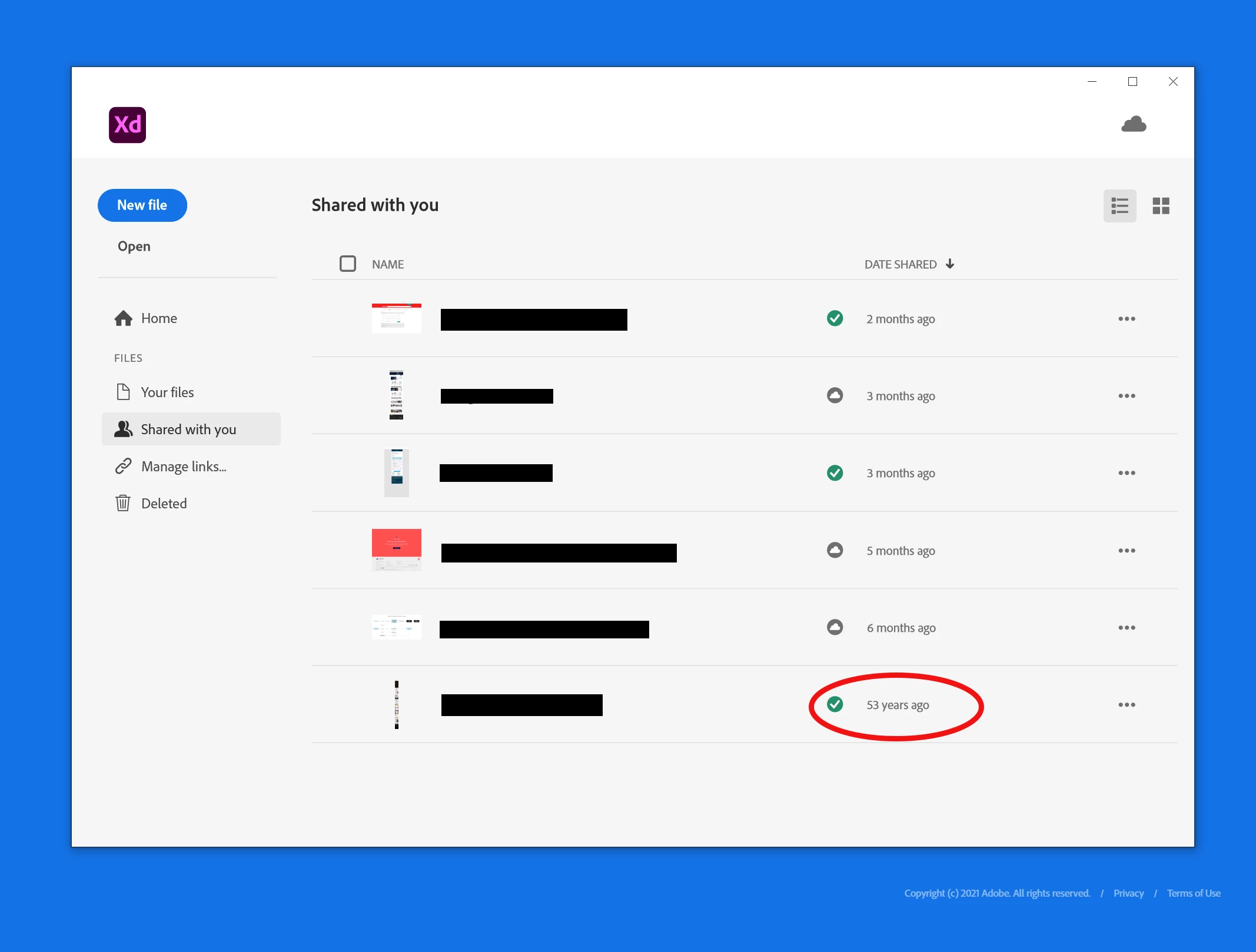
All this happens after CC was unable to validate my subscription for 2 days last week for no apparent reason.

Using Adobe software has become a complete nightmare that impairs efficiency and sends stress levels to the rooftops, especially when there's a deadline looming.

The constant issues are inexcusable.

The number of times that I've been told by support to reinstall everything (which takes several hours...) is beyond belief.

Whatever happens, I beg you to not drag Figma down the path of all your other applications.

    This topic has been closed for replies.
    Correct answer akaBEZ

    I agree, XD is a nigjhtmare to work with. I get a developer online file to get the specs, nothing works!
    I can't download any assets, can't even download the assets if i use chrome developer tools!
    All kind of useless things are working like copy the images names, like who cares about that let me download the damn assets. some of the elemets have the colors in the CSS panel some not, how can i know the colors??? wtf kind of dev spec file is this? this POS software is so broken that my stress is indeed shooting through the roof.

    WTF is going on with you over there Adobe?
    Usless monopol with uselsss softwares, unbelivable, your product manager should be fired and never ever work in the UX field ever again. USELESSSSS

    16 replies

    akaBEZCorrect answer
    Inspiring
    March 6, 2023

    I agree, XD is a nigjhtmare to work with. I get a developer online file to get the specs, nothing works!
    I can't download any assets, can't even download the assets if i use chrome developer tools!
    All kind of useless things are working like copy the images names, like who cares about that let me download the damn assets. some of the elemets have the colors in the CSS panel some not, how can i know the colors??? wtf kind of dev spec file is this? this POS software is so broken that my stress is indeed shooting through the roof.

    WTF is going on with you over there Adobe?
    Usless monopol with uselsss softwares, unbelivable, your product manager should be fired and never ever work in the UX field ever again. USELESSSSS

    HARSHIKA_VERMA
    Community Manager
    Community Manager
    February 27, 2023

    Hi @mowglivj,


    We are sorry for the delayed response. I see you are experiencing as a similar issue reported here: https://community.adobe.com/t5/adobe-xd-discussions/time-stamp-of-the-files-shows-incorrectly-in-xd-55-version/td-p/13313319.


    This is a know bug, and the team is investigating on it. You'll see the improvements in the upcoming releases.


    We are sorry for the inconvenience.


    Thanks,

    Harshika

    mowglivjAuthor
    Inspiring
    February 7, 2023

    Now I'm typing in slow motion (when typing works!) I can type something, sit back and watch my text slowly appear while I drink my coffee.

    mowglivjAuthor
    Inspiring
    February 9, 2023

    and so it goes. I have to say that I'm not logging all the issues as it's too time consuming to explain . Most of the problems are well documented in this forum anyway. Plenty of them are marked as "resolved" despite this being blatantly untrue.


    9/2/23

    I have 3 instances of the same component stacked over each other to create an illustration. Part of the component is a rectangle with a stroke and drop shadow.


    -I edit the master component which is the bottom one of the 3 instances.

    -I outline the stroke of the rectangle.

        the drop shadow disappears and magically the component shifts its position on the layer stack. Now it's at the top.

    Great!

    mowglivjAuthor
    Inspiring
    February 9, 2023

    The biggest irony, in this case, is that the illustration made out of the 3 components is in a masked group which doesn't allow ME to change the order of the layers without ungrouping the masked group. You couldn't make it up.

    mowglivjAuthor
    Inspiring
    February 7, 2023

    Yet another random folder is created when creating a stack. I love matrioshkas.

    mowglivjAuthor
    Inspiring
    February 7, 2023

    It now appears impossible to create a stack and define the spacing, an ongoing stream of nested folders is created with no means to specify spacing in any of them.

    mowglivjAuthor
    Inspiring
    February 7, 2023

    I change the text leading to 14px, it changes itself back to 22px. And while I write this, XD is stuck on "reconnecting". Nothing wrong with my connection, everything else works fine.

    mowglivjAuthor
    Inspiring
    February 7, 2023

    Now I just had autosave making my screen blank before showing me my work again which incidentally is missing the last few changes that I made before the autosave. Good that I spotted it. Thanks XD for streamlining my workflow.

    mowglivjAuthor
    Inspiring
    February 7, 2023

    and it just did it again, oops!

    mowglivjAuthor
    Inspiring
    February 7, 2023

    and again...

    It must be a feature

    mowglivjAuthor
    Inspiring
    February 7, 2023

    5 mins later the cursor keeps getting stuck on the finger tool when having the pointer selected, making it impossible to select anything. Clicking around for a while restores the functionality. How much fun.

    mowglivjAuthor
    Inspiring
    February 7, 2023

    7/2/23

    Another day, more XD problems or should I say usual behaviours?

    I start the day without being able to type anything in XD. Clicking around and selecting different tools, finally enables typing again. Of course, this is all perfectly normal and acceptable on "professional " software.

    mowglivjAuthor
    Inspiring
    February 6, 2023

    Images rotated upon import appears to be the norm now

    mowglivjAuthor
    Inspiring
    February 6, 2023

    I make a stack, a random folder is added...