
Inspiring
December 9, 2020
Answered

Blurry images on export

  • December 9, 2020
  • 1 reply
  • 3167 views

I'm using XD for half a year now. I see a case that rendering raster images are too blurry on export.


For example, I use XD to make assets from 200x200 thumbails to 1920x1080 banners.

The images I place in those containers are easily over 4500x3000px images.

Everytime I export them in PNG or JPG100%, always look blurry.

Blurry images tend to be with bigger file sizes as well.


I checked on a non-retina display, I checked doing the exact same thing on Photoshop, I checked different computers and so on. Photoshop always turn out much sharper in comparasion after export with the same conditions.

Here's 2 400x400 PNG images from XD and Photoshop in comparasion. The placed original image is 1400px wide. (I've attached them as well for precise comparasion)
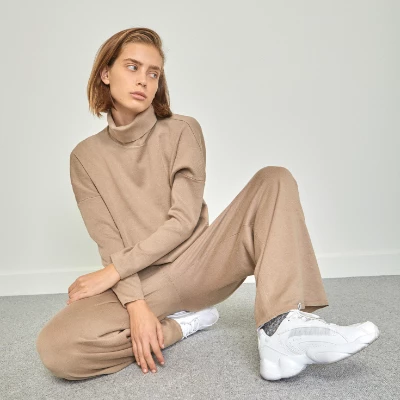
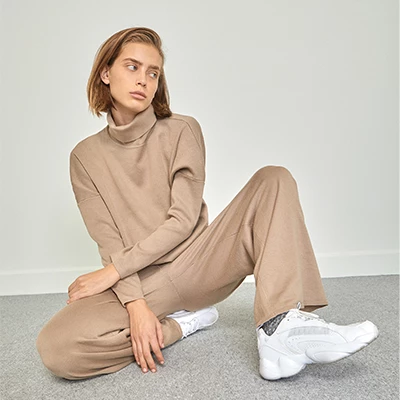
This topic has been closed for replies.
Correct answer Spas K.

It's an anti-aliasing problem. Unfortunately, Xd has a far less advanced engine for handling raster graphics than Photoshop, or at least we don't have control over it. I've also noticed it struggles at certain scaling percentages and you need to tweak it by a small amount until you get the "sharp" version.


Same thing happens in Photoshop sometimes, but at least you have settings for AA modes and more control overall. That's why I generally avoid relying too much on Xd for raster assets.


It is still an issue and I hope the dev team makes it a priority. I guess they are focusing on prototyping features / vectors more, and less on the raster graphics fidelity, at least for now. People have been asking about other features like color modes, proofing etc. as well.


The only "solution" for now is to resize in Photoshop and only work with 100% scaled images within Xd, when it's crucial to use the actual images and they are not just a placeholder.

1 reply

Spas K.
Community Expert
Spas K.Community ExpertCorrect answer
Community Expert
December 9, 2020

It's an anti-aliasing problem. Unfortunately, Xd has a far less advanced engine for handling raster graphics than Photoshop, or at least we don't have control over it. I've also noticed it struggles at certain scaling percentages and you need to tweak it by a small amount until you get the "sharp" version.


Same thing happens in Photoshop sometimes, but at least you have settings for AA modes and more control overall. That's why I generally avoid relying too much on Xd for raster assets.


It is still an issue and I hope the dev team makes it a priority. I guess they are focusing on prototyping features / vectors more, and less on the raster graphics fidelity, at least for now. People have been asking about other features like color modes, proofing etc. as well.


The only "solution" for now is to resize in Photoshop and only work with 100% scaled images within Xd, when it's crucial to use the actual images and they are not just a placeholder.

boris-mAuthor
Inspiring
December 9, 2020

Thanks for the great answer,

I started using XD when I saw PS and AI slow down on a powerful machine when I do 100's of assets each day.

XD Components are a career saver compared to PS Smart Objects. ...Even if presentation takes a hit. 

Spas K.
Community Expert
Community Expert
December 10, 2020

Yeah, I had to use PS recently to make some banners with quite a few elements, due to it's superior scaling / AA, but as you said, even with 2-3 artboards, it quickly becomes a nightmare 🙂