
Inspiring
July 18, 2018
Answered

Border stroke

  • July 18, 2018
  • 2 replies
  • 423 views

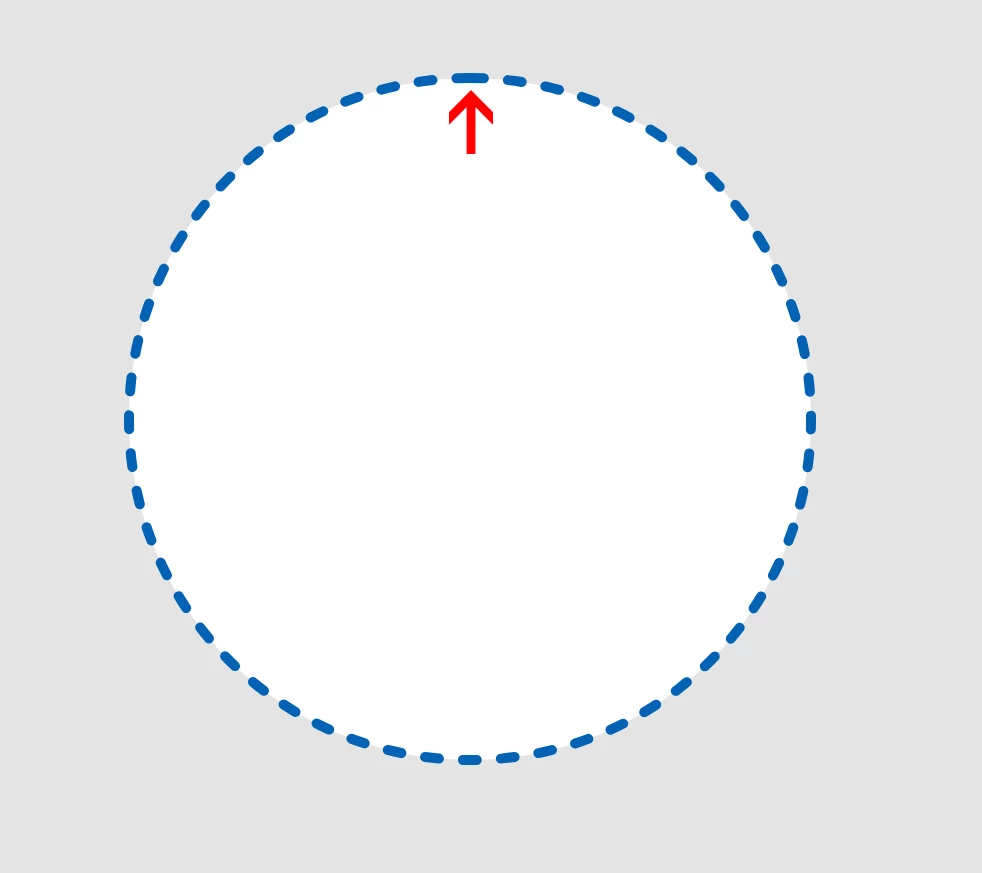
This circle has a round cap border stroke of 5, a dash of 7 and a gap of 12. Why doesn't the topmost dash match the size of the rest? It's longer. This also happens if the border is a butt cap or a projecting cap so that doesn't change anything.  Inner or outer stroke doesn't change anything either. The topmost point always gets bigger. I'm on W10. Last July update of XD.
    This topic has been closed for replies.
    Correct answer Preran

    Sharing response from the team, "currently we honor exact gap and dash lengths. So if the dash and gap lengths do not evenly go around the circumference of the circle, the merged dash will occur".

    What I understand is that to avoid the merge or the incorrect gap on the top, the software would have to average/modify the gaps or the lengths (which would lead to the software automatically changing values for those).

    If you would like to provide suggestions on improving this feature, I suggest using Uservoice Adobe XD Feedback : Feature Requests & Bugs​ to do that.

    Thanks,

    Preran

    2 replies

    Preran
    PreranCorrect answer
    Legend
    July 18, 2018

    Sharing response from the team, "currently we honor exact gap and dash lengths. So if the dash and gap lengths do not evenly go around the circumference of the circle, the merged dash will occur".

    What I understand is that to avoid the merge or the incorrect gap on the top, the software would have to average/modify the gaps or the lengths (which would lead to the software automatically changing values for those).

    If you would like to provide suggestions on improving this feature, I suggest using Uservoice Adobe XD Feedback : Feature Requests & Bugs​ to do that.

    Thanks,

    Preran

    Preran
    Legend
    July 18, 2018

    I am able to reproduce your issue. Let me check with the team and get back.

    Thanks,

    Preran