

FrancoBits
Legend
July 12, 2021
Question

[BUG] [HANDOFF] Developer link not working right with scroll groups

  • July 12, 2021
  • 1 reply
  • 893 views

I created a scroll group with elements inside it and created a developer link to share with the developers of my team.


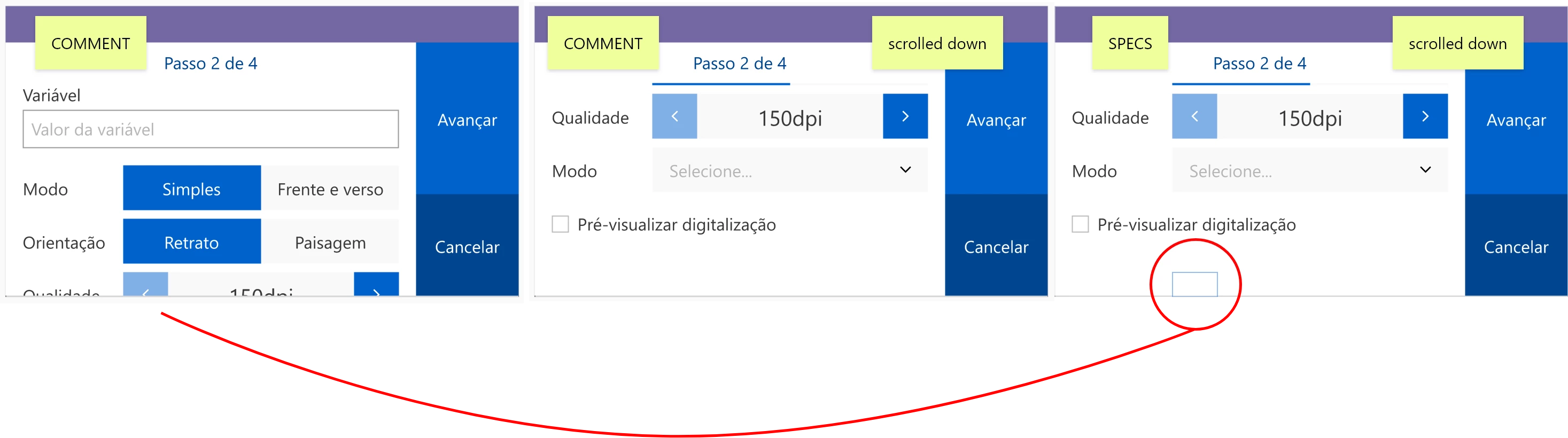
It happens that the handoff link doesn't work well with scroll groups. When in COMMENT panel, the developer can navigate in the prototype and scroll the group down. When changing to SPECS panel and try to inspect the elements, the mouse pointer identify things in the original position. When changing back to COMMENT panel, the design get's back to the original state (scroll grupo reset at the top).


Please fix this ASAP.  
 

This topic has been closed for replies.

1 reply

Ares Hovhannesyan
Community Expert
Community Expert
July 12, 2021

Is it possible to get a sharable link to test?

FrancoBits
Legend
July 12, 2021

Sure!

https://xd.adobe.com/view/dd10b005-9d99-4cb6-9688-541192c04818-8843/screen/dcbf7508-dd92-4282-a7d0-807f560359c4/


To test:
Scroll down in the main area (settings) and change to specs panel. You'll be able to select a component at the bottom of the artboard, but the component is at the top of the artboard now. Selecting its' "ghost" you can change the component's state and see it changing in the top

Participant
September 16, 2021

I'm having th same issue. When you scoll to any itmes bellow the fold dveloper review is broken.
https://xd.adobe.com/view/929830e9-f84f-420a-b6ed-a25f76d159a5-c7cb/