Participant
August 14, 2020
Answered

Bug in Width and Height

  • August 14, 2020
  • 2 replies
  • 692 views

Hi,
I found a bug in XD when i insert a value in width box then height does change and when i insert a value in height then width does change. I think this is a big issue...Kindly fix it.

    This topic has been closed for replies.
    Correct answer Vertika Gupta

    Hi RJ Varun,

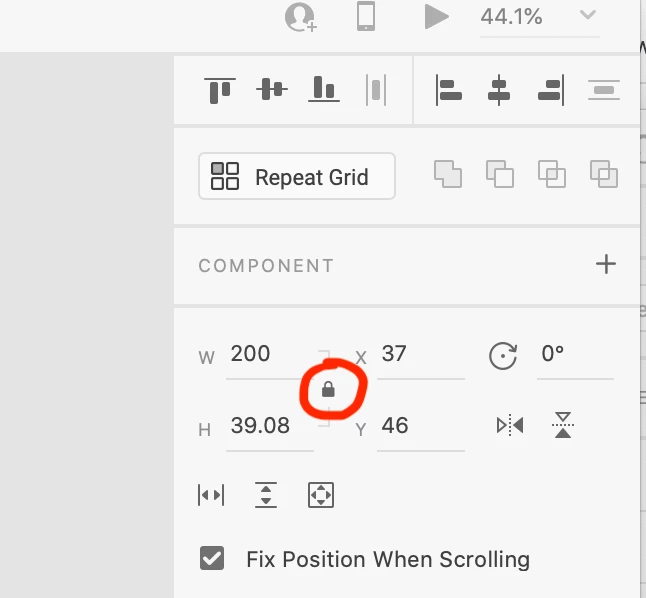
    I think while you are changing height or width, during that aspect may be lock, please unlock it, so it will behave like this only. you can change the value sepeartely if you unlock aspect. If aspect is lock, changing any one value either height or width, value of other will get change. please have a look to screenshot, where you can see lock aspect.

    If that not the case, please share a video with us.


    Thanks, 

    Vertika Gupta

    Adobe XD

    2 replies

    Rishabh_Tiwari
    Legend
    August 14, 2020

    Hi Varun,


    Thanks for reaching out, as explained by Vertika this happens when the aspects ratio is locked, for more information you can refer to this help article: https://helpx.adobe.com/xd/help/resize-and-rotate-objects.html


    Feel free to reach out to us in case if you have any other questions or issues in the future.


    Regards

    Rishabh

    Vertika GuptaCommunity ManagerCorrect answer
    Community Manager
    August 14, 2020

    Hi RJ Varun,

    I think while you are changing height or width, during that aspect may be lock, please unlock it, so it will behave like this only. you can change the value sepeartely if you unlock aspect. If aspect is lock, changing any one value either height or width, value of other will get change. please have a look to screenshot, where you can see lock aspect.

    If that not the case, please share a video with us.


    Thanks, 

    Vertika Gupta

    Adobe XD