
Franck Payen
Inspiring
September 11, 2021
Question

Bug : transparent png turns into shape…

  • September 11, 2021
  • 2 replies
  • 657 views

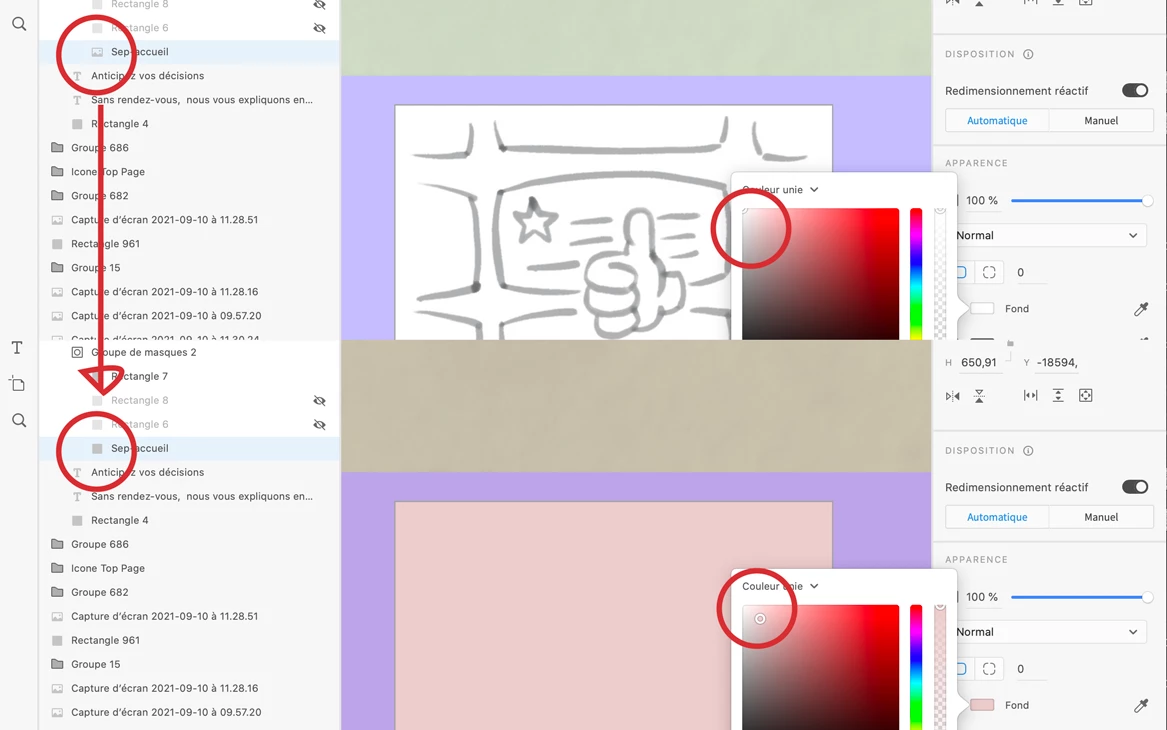
Weird one, I have a transparent png file and wanted to change its color. Too bad, it's not working BUT, worse than that, XD removes the image. 

I can see in the layer panel that before, the image had an… image icon.

After picking one color, the image disappeared and only the rectangle shape is there.


I cannot always count on seing it immediately, if I realise too late, then I might have a lot of work lost…
 

    This topic has been closed for replies.

    2 replies

    Spas K.
    Community Expert
    Community Expert
    September 15, 2021

    Image objects are pretty much the same as a rectangle, only their "Fill" is an image. The moment you apply any change to the fill color, the fill changes to solid color, and the image is gone (layer becomes a regular rectangle). Unfortunately, for now we can't set 2 different fills on a layer. It's how it has always worked, although I agree it's counterintuitive, or confusing at best.


    To achieve your desired result, follow Myra's instructions with the blend modes.

    Myra Ferguson
    Community Expert
    Community Expert
    September 14, 2021

    It appears that XD may be replacing the object with the fill even if the fill is set with transparency.


    To change the color of your artwork, try creating an additional rectangle over it, setting its color, and using a Blend Mode. If you'd like to change the color of the strokes, set the Blend Mode to Screen. If you'd like to darken it all with a background color, set the Blend Mode to Multiply.