
arnol45212618
Participant
April 18, 2019
Answered

Can anybody tell why i can't use the "share" in adobe xd cc ?

  • April 18, 2019
  • 2 replies
  • 2708 views

as the title said,

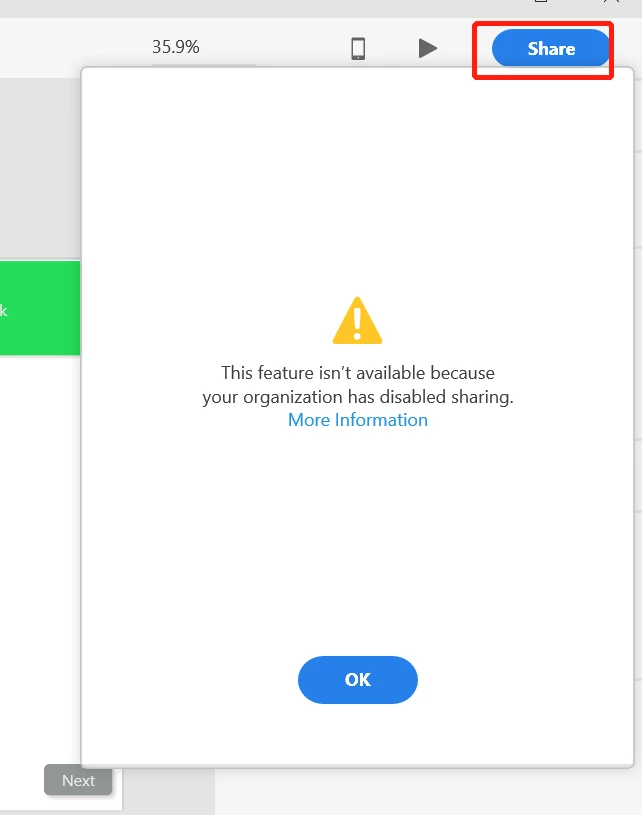
after i finished my desgin,i wanna share it with the link . but when i click "share" button , it will show me something wrong .

does anybody met this issue before ?

thanks.
This topic has been closed for replies.
Correct answer italosan

Your organization does not have access to Creative Cloud services. Services may not be available in your locale, or your IT administrator has chosen to disable services. Anyway, I suggest you consult this web page: https://helpx.adobe.com/xd/kb/cannot-use-share-feature.html

2 replies

italosan
Community Expert
italosanCommunity ExpertCorrect answer
Community Expert
April 18, 2019

Your organization does not have access to Creative Cloud services. Services may not be available in your locale, or your IT administrator has chosen to disable services. Anyway, I suggest you consult this web page: https://helpx.adobe.com/xd/kb/cannot-use-share-feature.html

James K Fox
Participant
October 26, 2022

Good afternoon,

I seem to running into this issue with XD on my account, only my CC subscription is an Creative Cloud Individual one, not controlled by anyone else. 

I first saw this issue crop up on Monday 24th Oct 2022 and it still persists.  It was working Monday morning and then stopped all of a sudden before miday (GMT).

Any help to resolve this would be appreciated.  Thanks.

XD version 55.0.12 on Windows 11.

HARSHIKA_VERMA
Community Manager
Community Manager
October 26, 2022

Hi @James K Fox,


We are sorry to hear you're having trouble sharing in XD. This is a known issue, and the team is investigating it. As a workaround, could you please try signing out of XD, Creative Cloud Desktop app, restarting the machine, and then signing back in?


Let us know if that works for you. We'll keep you posted on the bug.


Thanks,

Harshika

Participant
April 18, 2019

I had it when my company blocked that feature.

But for now it's unlock but I can only share it with the person of my company.