Inspiring
November 17, 2021
Answered

Can I do a notification on a new page slide in and slide out effect?

  • November 17, 2021
  • 4 replies
  • 1232 views

The flow is I click a button --- go to a new page --- a notification slide in --- stay 3 seconds --- slide out.

Is it possible to achieve this in XD?

Thanks guys!

This topic has been closed for replies.
Correct answer Ling Fei5F90

Thanks Chris, the auto-animate way works perfectly.
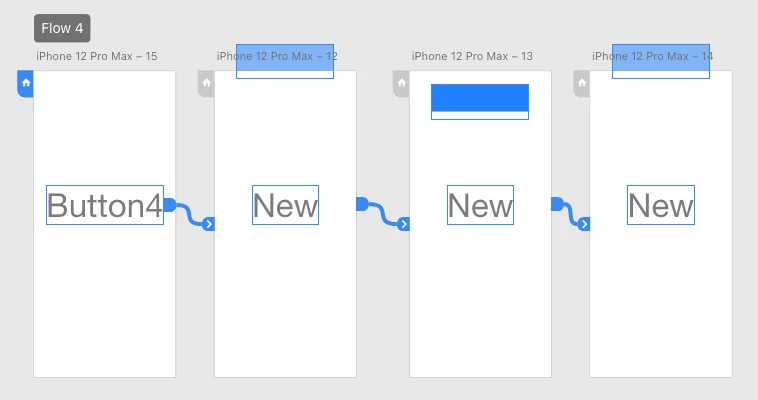
Artboard 2-3, 3-4 use auto-animate, smoother animation actually. 

4 replies

Inspiring
November 18, 2021

Hey guys, finally with the help of Kenneth, I achived the effect.

Here I will explain how to do it and what the trick is.

The trick is the 4th page. I need to create a 4th page with no content to make the 3rd page (toast page) to slide out.

Have to say it's not intuitive but it works.

@Rishabh_Tiwari @Chris W. Griffith @Kenneth Kawamoto 

Chris W. Griffith
Community Expert
Community Expert
November 18, 2021

You can do it with two artboards. 🙂

On artboard 1, have the notification elements off screen. Then set the interaction wire on the button to auto-animate. On the second artboard, just have the notification element positioned where you want it. Then just add a time wire to auto-animate back to art board 1. 🙂


Ling Fei5F90AuthorCorrect answer
Inspiring
November 18, 2021

Thanks Chris, the auto-animate way works perfectly.

Artboard 2-3, 3-4 use auto-animate, smoother animation actually. 

Community Expert
November 18, 2021

Is this closer to what you are after by any chance...?

https://xd.adobe.com/view/bc85335f-f6b9-48f9-a6f5-82593d07ded4-e9d6/?fullscreen

Inspiring
November 18, 2021

Hey Kenneth, it is the exact effect I need.

Do you have a link to the tutorial?

Thanks.

Inspiring
November 18, 2021

XD cannot do slide in and slide out, the very common prototype simulation that most App already has and been using.

How many years XD out in the market?

Chris W. Griffith
Community Expert
Community Expert
November 18, 2021

XD can do this. Slide In and Out are just position changes. You just have to spread the sequence across various artboards. It is not possible within a single artboard.

Inspiring
November 18, 2021

This is what I can do the best with XD.

https://xd.adobe.com/view/603a03b6-7ac6-48ca-a9ee-7ac536b634a2-3569/

Can you achive that I describe in the quaestion?

click a button --- go to a new page --- a notification slide in --- stay 3 seconds --- slide out.

With respect, convinve me with sth solid?

Rishabh_Tiwari
Community Manager
Community Manager
November 17, 2021

Hi Ling,


Thanks for reaching out. You can try the combination of multiple artboard with time trigger and slide the notification you can use overlay artboard.


Let us know if this is what you were looking for or if you are trying to achieve something else.


Regards

Rishabh


Inspiring
November 17, 2021

No, this is not what I described in the question.

The effect is slide in and slide out.

The solution you gave is not a professional way to handle.