

Participant
November 29, 2023
Question

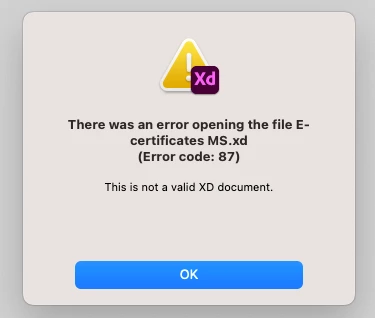
Can someone help to resolve this error?
  • November 29, 2023
  • 1 reply
  • 318 views

I am unable to retreive my files in Adode XD. Is there a workaround for this? Is there a backup place from where I can access my cloud files? 

 

    This topic has been closed for replies.

    1 reply

    Chaitanya21936374hmkf
    Community Manager
    Community Manager
    November 30, 2023

    Hi @Neha2740188264wc ,

    Sorry to hear you are having trouble opening the XD file. Would you mind telling us if it's a cloud document or a local document?


    If it's a cloud document, please try opening the file from here: https://assets.adobe.com/cloud-documents. If that doesn't help, please try the steps suggested in this article: https://helpx.adobe.com/xd/kb/fix-issues-with-xd-cloud-documents.html.


    Let us know if that helps.


    Thanks & regards,
    Chaitanya Shandilya

    Participant
    December 1, 2023

    Hi @Chaitanya21936374hmkf 


    Thanks for replying. I tried checking the cloud assets folder. But it doesn't have any of my files. Also, tried updating , retsarting and relogging into Adobe. I am unable to sync to the cloud. I checked with my IT team as well. They also aren't able to figure out a solution. My subscription had ended a couple of days ago. But I assume there should be some work around for this. Sharing a screenshot of file syncing issue:

    Is there anything you could do to give me access to my source files?

    Thanks in advance!

    Chaitanya21936374hmkf
    Community Manager
    Community Manager
    December 13, 2023

    Hi @Neha2740188264wc ,
    Could you please share me your user id via dm and also please check while signing in if you are getting two profiles you are selecting the correct one.

    Thanks & regards,
    Chaitanya