Participant
Jan 15, 2021 4:28 PM UTC
Answered

Can't add names to colors

Hello All,


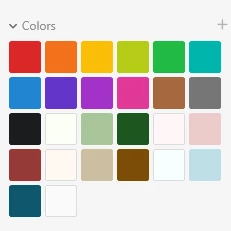
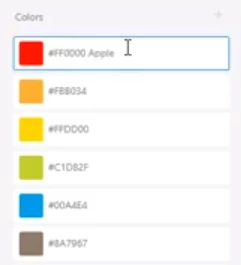
I apologize if this is silly, but I have looked over tutorials to understand how to add a name to a color to make it a design token. However, I'm unable to do so because my panel looks different. It does not include any name only a swatches palette. Could someone tell me what I'm doing wrong?

My display:
Tutorial displays:
 

Thank you,

Eric 

This topic is closed to new replies. Start a new post to keep the conversation going.
Harshika Verma
Harshika VermaCorrect answer
Community Manager
Jan 15, 2021 5:20 PM UTC

Hi Eric,


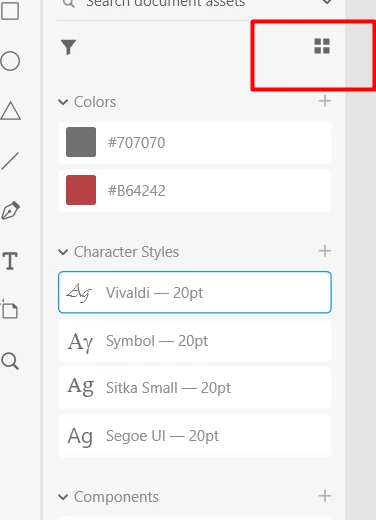
Thank you for reaching out and using Adobe XD. You need to switch from "List view" to "Grid view" and then you should be able to rename assets in the panel. Please see the attached screenshot below-


Hope it helps.


Thanks,

Harshika

3 replies

Harshika Verma
Community Manager
Harshika VermaCommunity ManagerCorrect answer
Community Manager
Jan 15, 2021 5:20 PM UTC

Hi Eric,


Thank you for reaching out and using Adobe XD. You need to switch from "List view" to "Grid view" and then you should be able to rename assets in the panel. Please see the attached screenshot below-


Hope it helps.


Thanks,

Harshika

Translate
Participant
Jan 15, 2021 8:44 PM UTC

That's it! Thank you so much.


I feel silly missing that. I think I clicked everything but.


Stay safe and be well,

Eric

Translate
Harshika Verma
Community Manager
Community Manager
Jan 20, 2021 7:50 PM UTC

You're welcome. Please feel free to reach out to us in the future for any query related to XD. We'd be happy to help.


Thanks,

Harshika

Translate