

Dave Van
Participant
September 21, 2020
Answered

Can't connect to Document - Someone is editing this document in an older version of XD

  • September 21, 2020
  • 6 replies
  • 2616 views

Hello, I am having an issue that I am hoping for some support with. The following error message is displayed to me when I am trying to open an XD file. Normally this is not a big issue, though it is very annoying, as I just reach out to the person mentioned and politely ask them to update their XD version or close the file. 
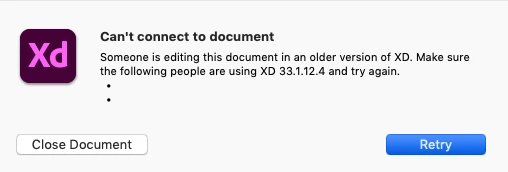
In the image above the names are removed, but you get the idea.


How should I handle a situation where a designer has gone on a two week vacation and left a version of this XD document open? Surely I don't have to wait two weeks for their return before regaining the ability to edit this file?


Similarly, on larger projects where there could be 10+ people editing the same document, how can I avoid having to repeatedly reach out to members of the team asking them to update? With a collaborative file this large there is always someone who has the file open who is out of date. 


Any help would be greatly appreciated!


Thanks, Dave

This topic has been closed for replies.
Correct answer Kyp

A workaround just to open the document locally for reading:
1. Click on the cloud document on the list
2. Disconnect from the internet (turn off wifi) while the loading bar is progressing

3. When the document loads, use File -> Save As Local Document...

4. Reconnect to the internet and use the local copy (changes won't be synced back but at least you can preview it)


6 replies

KypCorrect answer
Participant
July 4, 2021

A workaround just to open the document locally for reading:
1. Click on the cloud document on the list
2. Disconnect from the internet (turn off wifi) while the loading bar is progressing

3. When the document loads, use File -> Save As Local Document...

4. Reconnect to the internet and use the local copy (changes won't be synced back but at least you can preview it)


Rishabh_Tiwari
Community Manager
Community Manager
July 4, 2021

Hi there,


Thanks for confirming and sharing the solution, it will surely help other community members. Feel free to reach out if you need any further assistance.


Regards

Rishabh

Participant
March 19, 2021

I don't actually understand why the correct answer is marked as "contact with us directly" - it's purely a waste of time of the helpdesk and of mine. You will only get advised, "Ask those people to update their version of XD" anyways. There's no way around it. Even if I desperately want to work on the file, it's not possible because it will corrupt the file. 

Until XD updates the program to avoid the above, other tools mentioned by jasonc46262061 are the only way

TL;DR - Yes, every collaborator's XD needs to be updated.

HARSHIKA_VERMA
Community Manager
Community Manager
June 11, 2021

Hi All,


Thanks for sharing the feedback. It's recommended that you all should be on the latest version of XD while collaborating to avoid such conflicts. If the problem persists after updating to the latest version, please try the following steps-


  • Close XD and Creative Cloud desktop app.
  • End all XD and Creative Cloud processes from the task manager.
  • Restart the machine.


Let us know if you need further assistance. We'd be happy to help.


Thanks,

Harshika

wpe_jasonc
Participant
February 16, 2021

This is one of the major reasons why our company is moving to Figma. Collaboration and teamwide asset management and sharing on Adobe XD is simply not there yet, and we can't wait any more.

Rishabh_Tiwari
Community Manager
Community Manager
February 16, 2021

Hi Jason,


We're so sorry to hear about that. I understand there is always a scope for improvement in such workflows. While co-editing, it is necessary for all the collaborators to have the latest version of XD as we revise our document format with the new release to support the latest features. So if the document has been saved with a newer version, it can't be opened in an older version. Having said that, I understand your concern, so I will share your feedback with the Engineering team.


Regards

Rishabh

HARSHIKA_VERMA
Community Manager
Community Manager
September 29, 2020

Hi there,


We are sorry for the delay in response. Are you still experiencing the issue?  For immediate assistance, please connect with us directly using this link: https://helpx.adobe.com/contact.html so that we can help you directly.


Thanks,

Harshika

Participant
September 21, 2020

Agreed, when trying to work collaboratively the current situation makes this very difficult.

Participant
September 21, 2020

I have the same issue with our project files! ADOBE please help!!