


Participant
September 25, 2019
Question

Can't delete linked component from components panel

  • September 25, 2019
  • 6 replies
  • 4329 views

Hello, 


I'm trying to create a design system for a company.
I've imported their old components from an XD cloud document they are using at the moment for their projects, I've ungrouped the components and tweaked them a bit and created new updated master components on my XD cloud documment.

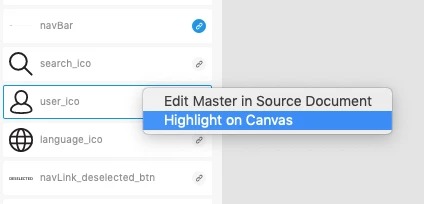
 Now my componets section of the assets panel is full of linked components I no longer use and the only two given options from the right click menu are to either edit master source document which takes me to the company current cloud document with all the components they are currently using on their projects or to highlight on canvas which is trigers a "0 instances of this document found" since I'm no longer using them.

I found on this forum a workaround that involves deleting the components from the source file which is my case is simply NOT an option. 

Can anyone please suggest a way to just get rid of the linked components I'm no longer using that does not involve editing the source document I've imported them from? Or is adobe planing to implement the ability to delete linked components from the component library in the near uture (seams like a pretty basic feature to me).


Thanks in advance!
 

This topic has been closed for replies.

6 replies

masons35645689
Participating Frequently
September 29, 2020

I think a solution should include unique meta IDs for each component created, and some way to distinguish between them in the asset manager. In the meantime, the solution from @Joris Debonnet worked for me.

Peter Villevoye
Community Expert
Community Expert
March 15, 2020

Ahh, well that's a bit more complex construction, and now I can easily reproduce your issue. And I must say, I think that's what I'd expect from it ! The changes you make are changes to instances of the component. As long as this is a component (and not just a plain group) the original is still required, in case you'd like to Reset the adapted instance to the original Master Component...


You need to Unlink the instances from their Master, and even delete Component B, in order to be able to delete Component A. It all makes sense, i.m.h.o.

Participating Frequently
March 15, 2020

Well, it makes sense, but that doesn't make it intuitive for users who are just starting out and using a UI Kit 🙂 They may copy in a whole menu bar (without realising it includes 'child components'), then replace the icons with their own, and then get confused why the old icons can't be removed from their components screen. (That's exactly what I did, which brought me here.)


I'm not saying the whole system must change, but I believe improvements could be made to make it more intuitive. For example, those 'child components' could show a greyed out 'Delete' option that upon click or mouseover explains "This component is used in the following component(s): [Component X]", or something like that.

Peter Villevoye
Community Expert
Community Expert
March 16, 2020

A tool like Adobe XD is not a toy or a simple hammer or screwdriver to handle intuitively. So users who are "just starting out" should first make themselves familair with structured features and methods in software like this, before digging in complex templates and kits, and freely copying from them.


People often ask me: "Could you train me in this or that application ? Just a short quick crash course, because I get templates to work with." Then I always ask them if I can please have a look at these templates, because their quality and complexity can vary a lot ! Such templates are often either downright useless (too basic, or make-shift methods) or too overly complex (too many tricks, or legacy elements). So succesfully taking over other users their templates and workflows, depends a lot on their applied approach and your skill level.


But Adobe XD software might indeed be a little more helpful by giving better or more feedback, when and why something is not working, or requiring extra care or actions to perform correctly.

Peter Villevoye
Community Expert
Community Expert
March 13, 2020

Does this problem still exist ?

I tested several scenarios, with local and cloud files, with the plus-button or simply by copying, but can't reproduce the issue. I can easily delete any unused linked component, even any new ones in use ! (Any instance turns into a plain element.)

Participating Frequently
March 15, 2020

Yes, the problem still exists. Here's a simple case to reproduce the issue:


  1. Inside the 'master document':
    1. Create a small circle. Make it into "Component A".
    2. Create a bigger rectangle behind the circle. Group it with the circle. Make this group into "Component B".
    3. Select the group and copy it to clipboard.
  2. Inside the 'child document':
    1. Paste from clipboard. The result is that the group appears in the document, and both Component B and Component A are linked into the document's list of components.
    2. (optional) Inside your document, delete the circle from the group, because you only really wanted the rectangle.
    3. Now try to delete Component A from the list of components. You can't, because (invisibly) it's "required" for Component B to exist.


Step 2.2. is not really needed, but may help to explain why people may expect 2.3. to work.

Participating Frequently
March 11, 2020

A workaround for simple use-cases was posted by IAlreadyHadAScreenName in this thread:

https://community.adobe.com/t5/adobe-xd/unable-to-delete-components-from-the-component-panel-in-xd/m-p/10975627?page=2#M24960


The main idea is that components that can not be deleted, are part of another component inside the same document. Find that 'parent' component, delete that, and then you'll be able to delete the 'child' components.

Abbenyi
Participating Frequently
March 11, 2020

As others have pointed out, that's not a viable solution. Components in other documents depend on that parent component. If you delete the parent component just for the benefit of this one document it gets deleted in all those other documents that use it. You'd have to create a new parent component and manually place that component in every design where that old component was. Duplicating hours of work. If you could link all those child components to a new parent, that would solve most of the problem. But currently that feature isn't available. The other part of the problem is being able to delete a child component really shouldn't be an issue to begin with.

Participating Frequently
March 12, 2020

I do not mean deleting the component in the master document. I mean deleting the parent component inside the document that includes child components that are no longer used.


For example, if you copy-paste a navigation bar from a UI kit, it will copy icons as components as well. You can't really see it, but they are considered "child components" of the navigation bar, which itself is imported as a component as well. If you delete a few icons from your design because you don't need it, they are still in the components list, undeletable. Unless you delete the navigation component; then you can also delete the icons. This does not harm the master document.


Admittedly, this is just a simple use case, and it's still a workaround, not a real solution.

Participant
October 7, 2019

I have had this same issue for several versions of XD now.


If you can (which it looks like from your screenshot you cannot), try making it a local Component then deleting said local Component from the Components list.


How did you import the company's "old components"?
If you brought them in through the "Link Assets" dialog (by pressing the plus icon at the top right of the Components panel) and then selecting a document to bulk import assets from, I believe those are permanantly linked (and cannot be unlinked) through the original document. Importing Assets in this way essentially makes links to ALL ASSETS of the imported file. 


I believe you would have to delete the Master Component in the Master document to remove them from your linked Components in your new document. 

jensklang
Known Participant
October 8, 2019
That is in any way no solution. The master documents is still the master document, and are in used by other documents. We cant remove components from the master.
Participant
September 26, 2019

I came here looking for a solution for this same problem. Get it together Adobe, this software still has tons of bugs, crashes at random.