Known Participant
March 2, 2018
Answered

Can't install

  • March 2, 2018
  • 1 reply
  • 421 views

Hi, guys!

Without a long-winded introduction - here's my problem:
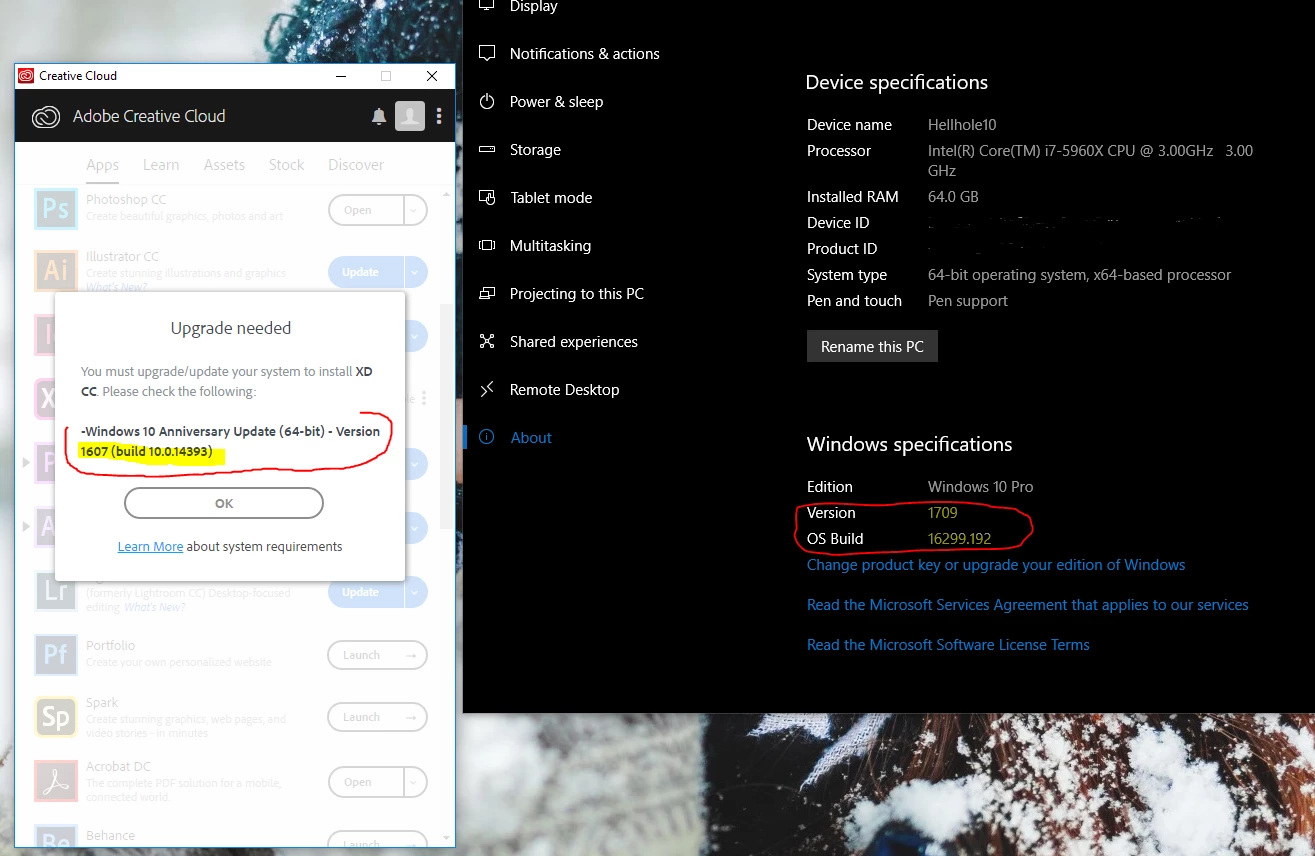
Any ideas?

As a side note - I have constant problems with the damn CC app. I wish I could just download software and updates manually like a big boy. All this app does is annoy me and run unnecessarily in the background doing hell knows what...

This topic has been closed for replies.
Correct answer Nina_Ramos_Harrison

Thanks for taking time to let us know you're seeing this problem. The first thing I recommend is you run the Creative Cloud cleaner tool and see if that helps unblock you, Use the Creative Cloud Cleaner Tool to solve installation problems

Do you know if your GPU meets the system requirements? If not, you may get blocked again. You can review our current setup guideline in the following page, Adobe XD System requirements

Hope this helps! Please comment further and let me know if you've managed to move ahead or are still stuck.

Thanks!

Nina

XD Community Quality Manager

1 reply

Nina_Ramos_HarrisonCorrect answer
Adobe Employee
March 3, 2018

Thanks for taking time to let us know you're seeing this problem. The first thing I recommend is you run the Creative Cloud cleaner tool and see if that helps unblock you, Use the Creative Cloud Cleaner Tool to solve installation problems

Do you know if your GPU meets the system requirements? If not, you may get blocked again. You can review our current setup guideline in the following page, Adobe XD System requirements

Hope this helps! Please comment further and let me know if you've managed to move ahead or are still stuck.

Thanks!

Nina

XD Community Quality Manager

RimVaiAuthor
Known Participant
April 10, 2018

Sorry for the late reply.

If the GTX 1080Ti doesn't meet the minimum requirements - I don't know what would.

Not sure how my GPU would flag up as an incorrect Windows version.