Inspiring
Jan 14, 2021 12:08 PM UTC
Question

Can't remove padding

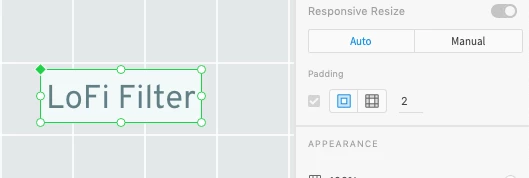
I applied some padding to a component and I now want to remove it but it appears impossible, The padding checkbox is ticked but the checkbox is greyed out so I can't disable it....

How does this work?

    This topic is closed to new replies. Start a new post to keep the conversation going.

    4 replies

    Participant
    Sep 4, 2021 2:17 PM UTC

    Cant remove padding too !

    Translate
    mowglivjAuthor
    Inspiring
    Jan 14, 2021 12:14 PM UTC

    the only workaround I found is to ungroup the component which makes using components pointless.

    How do these ill-conceived things make it to release? Seriously? QA anyone? Basic user testing anyone? Respect for your customers anyone? 

    Next I'll be asked to raise a feature request. 

    Translate
    Spas K.
    Community Expert
    Community Expert
    Jan 14, 2021 5:40 PM UTC

    When does it happen? Can you show a screenshot including the layers panel as well? Is the padding applied directly on the component?


    The only time the checkbox is greyed out for me is on an instance of a component, that has padding enabled. You can only edit the value on instances, but can't disable it. I can, however, disable it when editing the main component.

    Translate
    Harshika Verma
    Community Manager
    Community Manager
    Jan 27, 2021 1:17 AM UTC

    Hi there,


    Sorry to hear you are unable to remove the padding from the component. I am unable to reproduce it at my end on XD 36.1 windows10 machine. I would request you to please try this on a new component and share results with us.


    We will try our best to help.


    Thanks,

    Harshika


    Translate