Participant
December 3, 2020
Answered

Can't update XD to newer version

  • December 3, 2020
  • 2 replies
  • 739 views

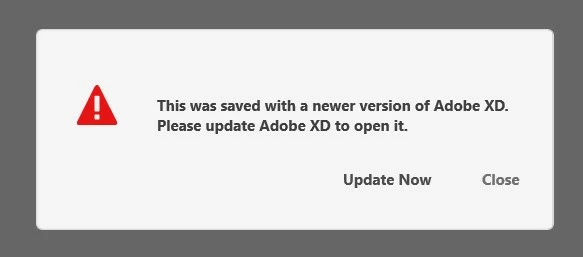
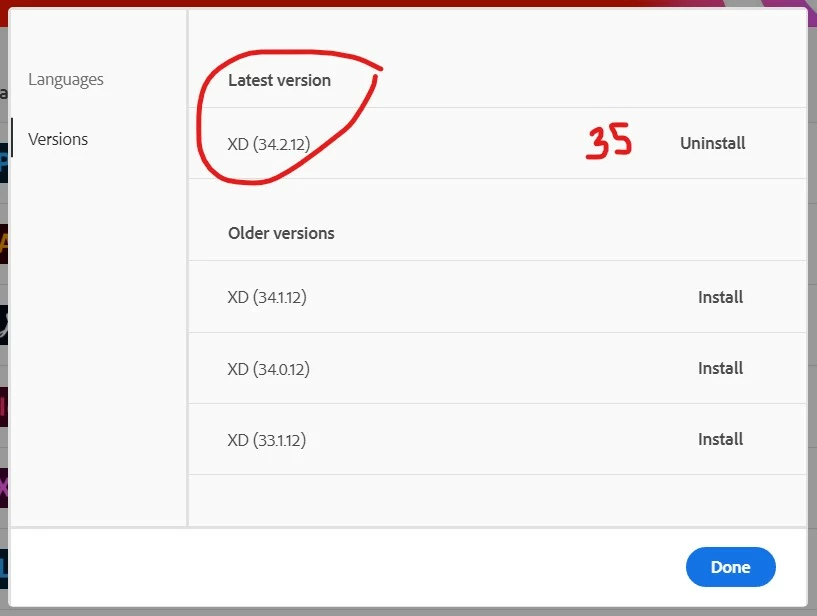
I having trouble opening newer version of the program because XD is not up to date, even though creative cloud thinks it's is but it's not the case. I tried to delete XD and install again and still I get the 34.2.12 version when the latest version is 35.1.12. What can I do to update it?


    This topic has been closed for replies.
    Correct answer italosan

    Hi, we're sorry you're having trouble with Adobe XD. Have you tried logging out and back in your Creatve Cloud account? Have you tried uninstalling Adobe XD via Creative Cloud Cleaner Tool? This way, in addition to uninstalling the software, you will also delete any corrupt files.

    2 replies

    italosan
    Community Expert
    italosanCommunity ExpertCorrect answer
    Community Expert
    December 3, 2020

    Hi, we're sorry you're having trouble with Adobe XD. Have you tried logging out and back in your Creatve Cloud account? Have you tried uninstalling Adobe XD via Creative Cloud Cleaner Tool? This way, in addition to uninstalling the software, you will also delete any corrupt files.

    Community Manager
    December 3, 2020

    Hi There,

    Please try by signout and sign-in from Creative cloud.

    Please let me know if it does not help. 


    Thanks,

    Vertika Gupta

    Adobe XD