Participant
February 7, 2018
Answered

Can we share and set private link in Adobe XD?
  • February 7, 2018
  • 4 replies
  • 1645 views


Just wondering if we can create a private link where only the people with the link can view?

Thank you

Correct answer ankushr40215001

Hi Jannah,

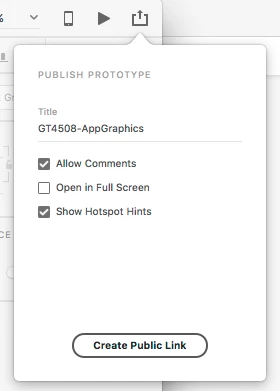
As of now, we have the only option of "create public link".

However, Shared prototypes are accessible online only to those with the link as they are not live.

Still, if you think there is a need for the option "Private link", you might want to file this in UserVoice: https://adobexd.uservoice.com/

Hope this helps.

Regards,

Ankush

4 replies

Participant
February 7, 2025

Participant
February 7, 2025

i have a big problem with the bridge!doesn t working.I OPEN THE APP AND THEN I HAVE THIS MESSAGE ERROR,AND THEN  CLOSING.WHY?>


Participant
February 15, 2018

Thank you Preran and AnKush for this!

Really helpful and fast replies.

I appreciate this so much!

More power to you guys!

Preran
Community Manager
Community Manager
February 9, 2018

In addition to what Ankush said, have a look at this request and vote for it if you think it matches your requirements.

Sharing Prototype in a closed network – Adobe XD Feedback : Feature Requests & Bugs

ankushr40215001
ankushr40215001Correct answer
Inspiring
February 8, 2018

Hi Jannah,

As of now, we have the only option of "create public link".

However, Shared prototypes are accessible online only to those with the link as they are not live.

Still, if you think there is a need for the option "Private link", you might want to file this in UserVoice: https://adobexd.uservoice.com/

Hope this helps.

Regards,

Ankush