sjorsp68900097
Participant
January 31, 2018
Answered

Can you Import Color palette's into Adobe XD?

  • January 31, 2018
  • 6 replies
  • 28031 views

I've been looking for material design gradient header color, googled alot and found a Material palette gradient colors, it gives me a zip. file but i have no idea where to import it. I know with Photoshop you can go to the folder and add the palette there, but I don't seem to find a similar option for Adobe UX. Is there another or easier way to do quickly get the colors you want in your assets?

This topic has been closed for replies.
Correct answer Peter Villevoye

How? I have Photoshop swatches (.ase files), but there's no option to import them into XD assets panel. That should be a basic functionality! Trying to migrate projects from PS to XD is such a nightmare...


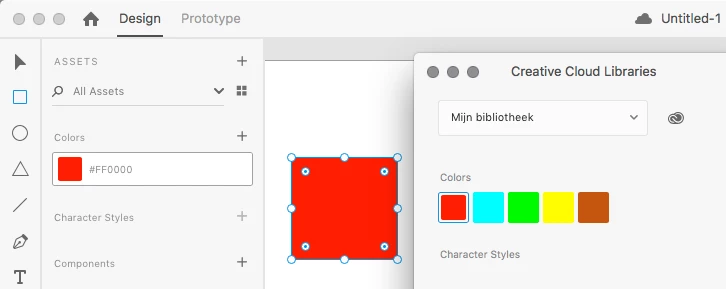
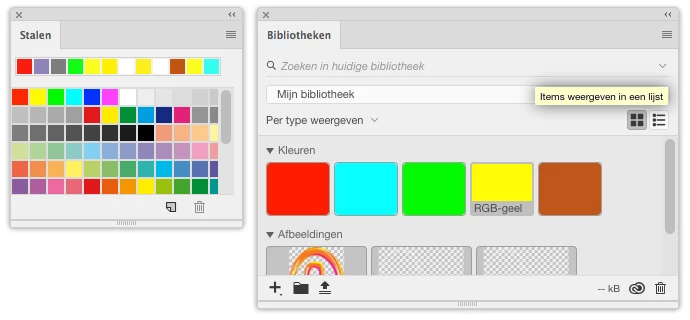
Existing color swatches from Photoshop or Illustrator can't easily be imported or opened in Adobe XD, because they work differently. Work-around: you can go to Photoshop, drag these colors from the Swatches panel to the Libraries panel, open the CC Libraries in XD, use them on an object an add the color to the Assets panel.

I know, it's a tedious approach, but that's the best you can do for now.

Don't forget to hit the VOTE button at Adobe XD Feature Requests & Bugs !

6 replies

Participant
July 13, 2021

The workaround still is very cumbersome very disappointed why this hasn't been incorporated.

Participant
July 8, 2020

It seems people do not understand the goal from the question. Adding colors to the "Assets" panel is not it. I too would like to know how to import color swatches into the color picker, so when you select an object, you can select the color you want to use. Why?


  1. Easier than goign to the assets panel all the time
  2. You might not want to save some colors to your assets (experimenting, etc.)


If not an easy way to import to the color picker, then the color picker should reflect the colors in your assets panel, at minimum. —Is there a valid reason Adobe is not doing this?


Paul Popa
Participating Frequently
May 17, 2021

I totally agree, James!
Not having the possibility to "import" the swatches from other XD files, make the working process incredibly annoying. To be forced to add the same colors with every new file is a slow working process.
For this, our workaround was to create a "master" file that has all our design system colors predefined into this file. So, every time someone would start a project, would have to copy the master file and use it for that particular task/project. 

This is how I ended up here, on this page, today. I was trying to find out when this feature will be added to XD. Seems we still have to wait for it. It's a shame. 

gustavonering
Participant
December 26, 2019

Another workaround: paste a bunch of rectangles (it can be any form actualy) with the colors of your palette, select all of them and press (+) icon on the Colors of ASSETS panel.


HARSHIKA_VERMA
Community Manager
Community Manager
December 26, 2019

Thank you for sharing the solutions here, Gustavo. This will definitely help our customers with this issue. 


Thanks,

Harshika

Melissa Gridley
Participant
May 31, 2019

It's been 2 years since that feature suggestion. How is this still not a thing? This feature omission creates endless headaches for designers.

elainecc
Community Manager
Community Manager
May 31, 2019

Actually, you can currently. With the linked assets workflow, you can now import color palettes as a part of your design system directly into your assets panel, which means you can do exactly this.

Design systems in XD

Participant
June 5, 2019

How? I have Photoshop swatches (.ase files), but there's no option to import them into XD assets panel. That should be a basic functionality! Trying to migrate projects from PS to XD is such a nightmare...

sjorsp68900097
Participant
January 31, 2018

Thanks!

Preran
Community Manager
Community Manager
January 31, 2018