
Cannot open xd file
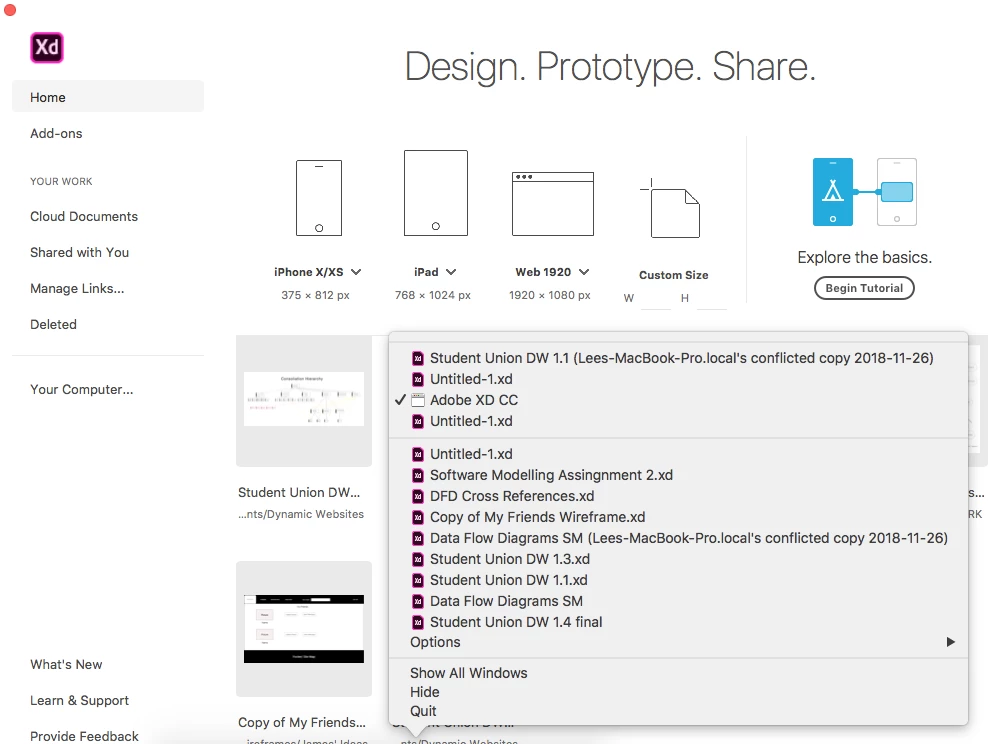
In adobe xd the file which I would like to open cannot be opened. the name of the file only shows when I right click icon (Mac) to reveal recently opened projects, it does not show in the home menu interface.
Working on two separate projects, I received a file from a team member about project1 while currently working on project2. on opening xd raised a dialog requesting update to match the received file, I clicked yes(regularly save current projects through cmd+s). All working fine until I exit project1 to return to project2 and its like the file never existed, except that it show in the right click menu. The selection is unresponsive like a link to a file or folder that has been removed.
I fail to understand the problem currently:
There were no error messages when using cmd+s in current project(2)
Xd toolbar messages seemed to work normally with autosaving, at least no save errors.
The first time I opened Project2 was though a spotlight search on .xd files as could not remember location. now this method does not work
Tried looking in TEMPDIR ie the OS temp directory
Painstakingly gone through all possible visible files where I would likely to have installed this inc could directories and memo cards
checked trash
checked XD "deleted" folder
It would be a help to get some suggestion maybe how to open the hidden directories of xd
No other suggestions as I do not understand the problem. Even the file I received and opened is still in recent list, this is located on dropbox shared file. Is there some possible way that I can retrieve autosaves from creative cloud, or find a way to get info on where the list item in the right click menu points to
Image below shows "DFD Cross Refences.xd" as the project which cannot be located
 AdChoices