Clever_Ocean15A9
Inspiring
August 5, 2020
Answered

CC Library not loading

  • August 5, 2020
  • 1 reply
  • 920 views

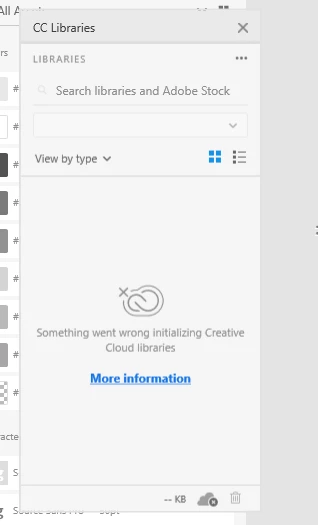
Needing to use some Adobe stock images in my XD file but the CC Library is telling me "something went wrong...". Have tried the following

  1. resfreshed the CC Library desktop app (windows)
  2. Restarted XD
  3. Restarted my computer


    This topic has been closed for replies.
    Correct answer Clever_Ocean15A9

    Sorry for the delay in response Satty. Could you please try the suggestion shared here: https://helpx.adobe.com/creative-cloud/kb/libraries-panel-not-working.html


    Let us know if this helps or if you need any further assistance.


    I was not having problems with CC Libraries itself or inside of any other program except XD. So after reading through the link you sent I tried once more to simply uninstall and reinstall XD and to my surprise it worked. Thanks for your time.

    1 reply

    Rishabh_Tiwari
    Community Manager
    Community Manager
    August 5, 2020

    Hi there,


    Sorry to hear about the trouble. We'll try our best to help you with it. Could you please try the steps shared below:


    • Sign out of XD and Adobe CC Desktop app.
    • Close CoreSync and all Adobe related processes from Task Manager/Activity Monitor.
    • Sign back in on Adobe CC Desktop app and launch Adobe XD from there and check again if it works or not.


    If this doesn't help, please share a few more details like:


    1. A screenshot of the About XD info page.
    2. The version of the Operating System.
    3. Are you able to use CC Library on different Adobe applications?


    Regards

    Rishabh

    Clever_Ocean15A9
    Inspiring
    August 5, 2020

    Hi Rishabh,


    Tried steps 1-3 and then again with a total restart and still having the issue.
    Libraries are working in InDesign, Illustrator and the CC desktop. Seems XD is the only place with the issue.


    Requested info below:


    Clever_Ocean15A9
    Inspiring
    August 11, 2020

    I had an XD updated come through but still having the same issue. The "About XD" info is still the same.

    Thank you for the help!