
Participant
December 10, 2020
Answered

Changing opacity in hover state not working

  • December 10, 2020
  • 1 reply
  • 5118 views

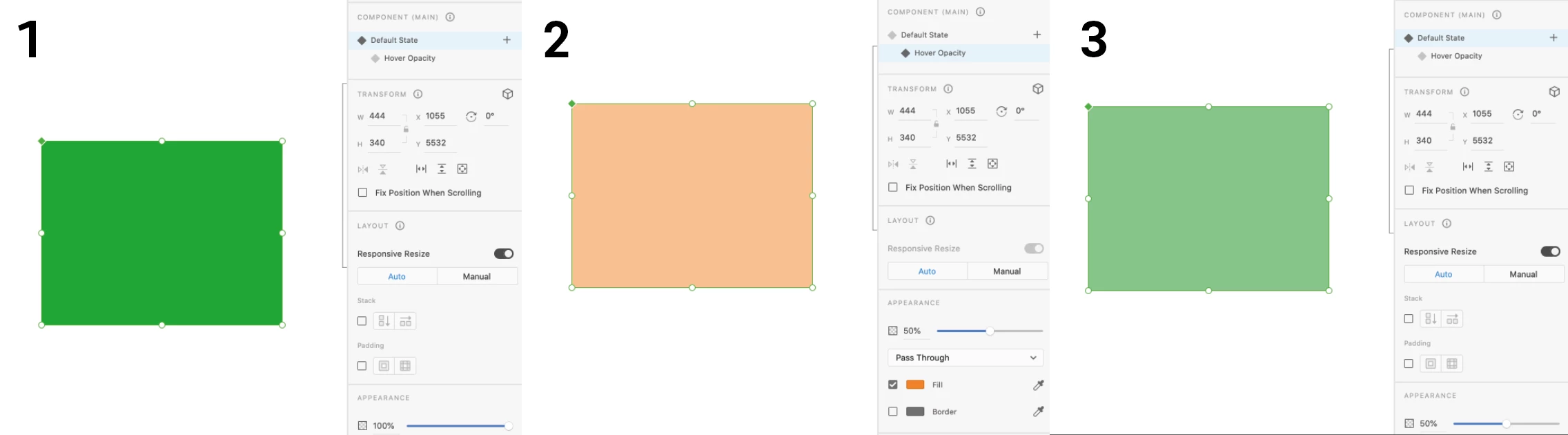
I'm trying to change the opacity of this rectangle when the object is hovered on. However, when I change the opacity in the Hover State, it also changes the opacity of the whole component. I've screenshot the three steps below to illustrate the issue


Hope someone can help!

Many thanks

S


    This topic has been closed for replies.
    Correct answer Rishabh_Tiwari

    Hi Sophie,


    Thanks for reaching out. To change the opacity of just the hover state, please select the hover state from the panel on the right and then double click on the object to go into isolation mode and then try changing the opacity. Let us know if this helps or if you need any further assistance.


    Regards

    Rishabh

    1 reply

    Rishabh_Tiwari
    Rishabh_TiwariCorrect answer
    Legend
    December 10, 2020

    Hi Sophie,


    Thanks for reaching out. To change the opacity of just the hover state, please select the hover state from the panel on the right and then double click on the object to go into isolation mode and then try changing the opacity. Let us know if this helps or if you need any further assistance.


    Regards

    Rishabh