Participant
April 8, 2019
Question

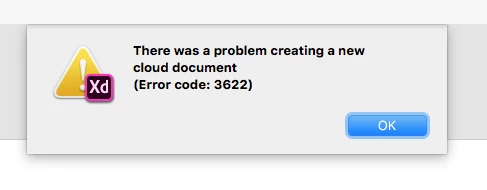
Cloud document - Error 3622

  • April 8, 2019
  • 2 replies
  • 882 views

Hi guys,

Since of today i get this strange 3622 error. It also doesn't load my cloud documents.

I tried to reinstall it. Also tried it with v17.01.12. My creative cloud app is also up-to-date: 4.8.1.435 running Mac OS. Also rebooted the PC. Tried everything. Could you help?

Kind regard,
Finn

This topic has been closed for replies.

2 replies

Atul_Saini
Community Manager
Community Manager
April 8, 2019

Hi Finnruijter,

Thanks for sharing the screenshot and version. As you are getting Error code 3622 while creating a new file, I would request you to try the steps mentioned here: - Issue saving xd files to creative cloud after updating it to Adobe XD 18. 

If the problem still persists, I would request you to share the version of Creative Cloud Sync and the location of Creative Cloud files folder.

Thanks,

Atul_Saini

Participant
April 8, 2019

Hi Atul,

Thanks for your response. I followed your steps, but it still doesn't work. I can see my cloud documents in other apps. Here is my version for CC Sync and the location:

Thanks in advance.

Kind regards,

Finn

Atul_Saini
Community Manager
Community Manager
April 8, 2019

Thanks for trying out the steps and sharing the version Finn, Sorry that you are unable to create a new document ever after trying the steps mentioned here: - Issue saving xd files to creative cloud.

In addition to this, I would request you reinstall Adobe Creative Cloud desktop app using this link: - Uninstall the Adobe Creative Cloud desktop application.

If the problem still persists, we would need some information and a few logs to investigate it further.

You may upload these logs to CC or Dropbox as a zip file and share the link with me in a private message. Go to my profile and find the message button on the right side below the cover picture area to message the details. Please let me know in case you face trouble grabbing any of the logs.

Thanks,

Atul_Saini

cmgap
Community Expert
Community Expert
April 8, 2019

Did you try completely signing out of your creative cloud manager? Can you see your cloud documents in other apps?