

cesarcam
Participating Frequently
March 11, 2020
Answered

Coediting erasing my changes if someone else saves document first in XD.
  • March 11, 2020
  • 1 reply
  • 1336 views

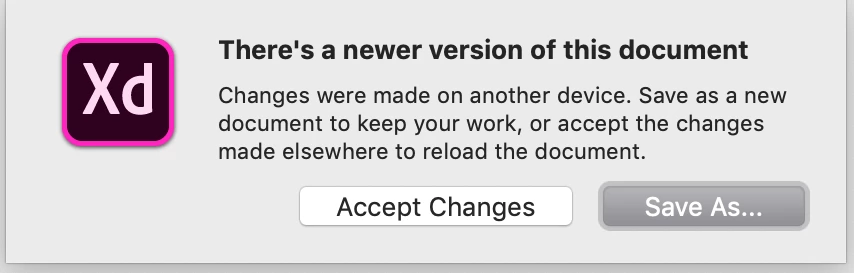
It seems that the co-editing feature in Adobe XD has stopped working properly. I've been editing a file that I'm working on with two other designers and if one of the other designers saves the file first, I get a dialog box asking me to either save a copy of the file or lose my changes to update to the new version of the file. This is not how co-editing used to work. Is this a bug?


I am not the creator of the file, the file was shared with me. Should the file creator try re-creating the file and sharing it again? We're all using the latest Adobe XD version of 28.0.12.10.


Thank you.


<The Title was renamed by moderator>

This topic has been closed for replies.
Correct answer Harshika Verma

Hi Cesar,


Thank you for reaching out. If I heard you right, it looks you doesn't  enabled "Enable coediting (Beta)" option in XD. You can enable Coediting (BETA) and invite your fellow designers to simultaneously access and edit your XD document. You can collaboratively edit a design document and view real-time changes that are saved as you work. Please see this article for more information: https://helpx.adobe.com/in/xd/help/collaborate-coedit-designs.html


Let us know if that helps.


Thanks,

Harshika

1 reply

Harshika Verma
Community Manager
Harshika VermaCommunity ManagerCorrect answer
Community Manager
March 11, 2020

Hi Cesar,


Thank you for reaching out. If I heard you right, it looks you doesn't  enabled "Enable coediting (Beta)" option in XD. You can enable Coediting (BETA) and invite your fellow designers to simultaneously access and edit your XD document. You can collaboratively edit a design document and view real-time changes that are saved as you work. Please see this article for more information: https://helpx.adobe.com/in/xd/help/collaborate-coedit-designs.html


Let us know if that helps.


Thanks,

Harshika

cesarcam
cesarcamAuthor
Participating Frequently
March 11, 2020

Hi there! Yes you are right. That fixed the issue. It was our mistake. Thank you so much for the prompt reply!

- Cesar Caminero - cesarcaminero.pro
Harshika Verma
Community Manager
Community Manager
March 11, 2020

Glad to hear you are back on track. Please feel free to reach out to us in the future for any query related to Adobe XD. We would be happy to help.


Thanks,

Harshika