


Participant
February 4, 2020
Question

[Collaboration]-Unable to revert to an earlier version in Adobe XD.

  • February 4, 2020
  • 1 reply
  • 897 views

Hi,

I'm attempting to restore an Adobe XD cloud document. From what I've found online it should be a fairly simple process. I follow this guide step by step https://helpx.adobe.com/ca/creative-cloud/help/open-revert-cloud-document-version.html

But when I get to the end and click the dropdown the one item I'm looking for ("Revert to this version") doesn't appear.

I'll attach a screenshot of what I'm seeing. I get two options but neither are revert?
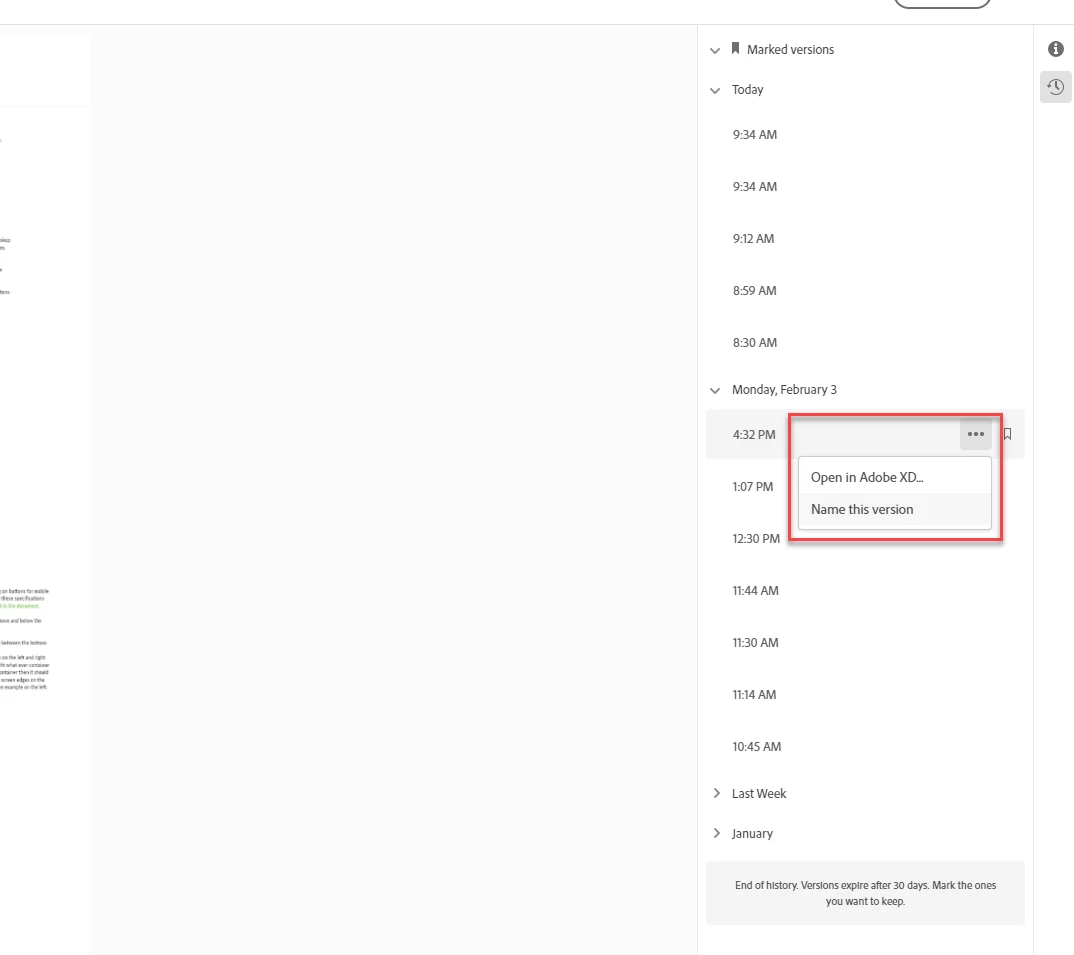


Any help would be great,
Thanks

<The Title was renamed by moderator>


This topic has been closed for replies.

1 reply

Participant
February 4, 2020

Additionally if I follow this process from within the XD app I still don't see the option to "revert". I can open old versions and save them as new cloud documents but I want to maintain my current cloud document and revert it to and older version. Is this possible?

Harshika Verma
Community Manager
Community Manager
February 4, 2020

Hi there,


Thank you for reaching out. We would suggest getting in touch with our support team using this link: https://helpx.adobe.com/in/contact.html so that our support team can help you on a real time basis.


Hope it helps.


Thanks,

Harshika

Participant
March 24, 2021

I have the same issue.
According to your help section it should be possible to revert to an older file, so this is rather confusing that it doesnt work.
Any news on this? @HARSHIKA_VERMA @elainecc ? 😭