
Participant
November 16, 2021
Question

Color picker breaks grid

  • November 16, 2021
  • 1 reply
  • 405 views

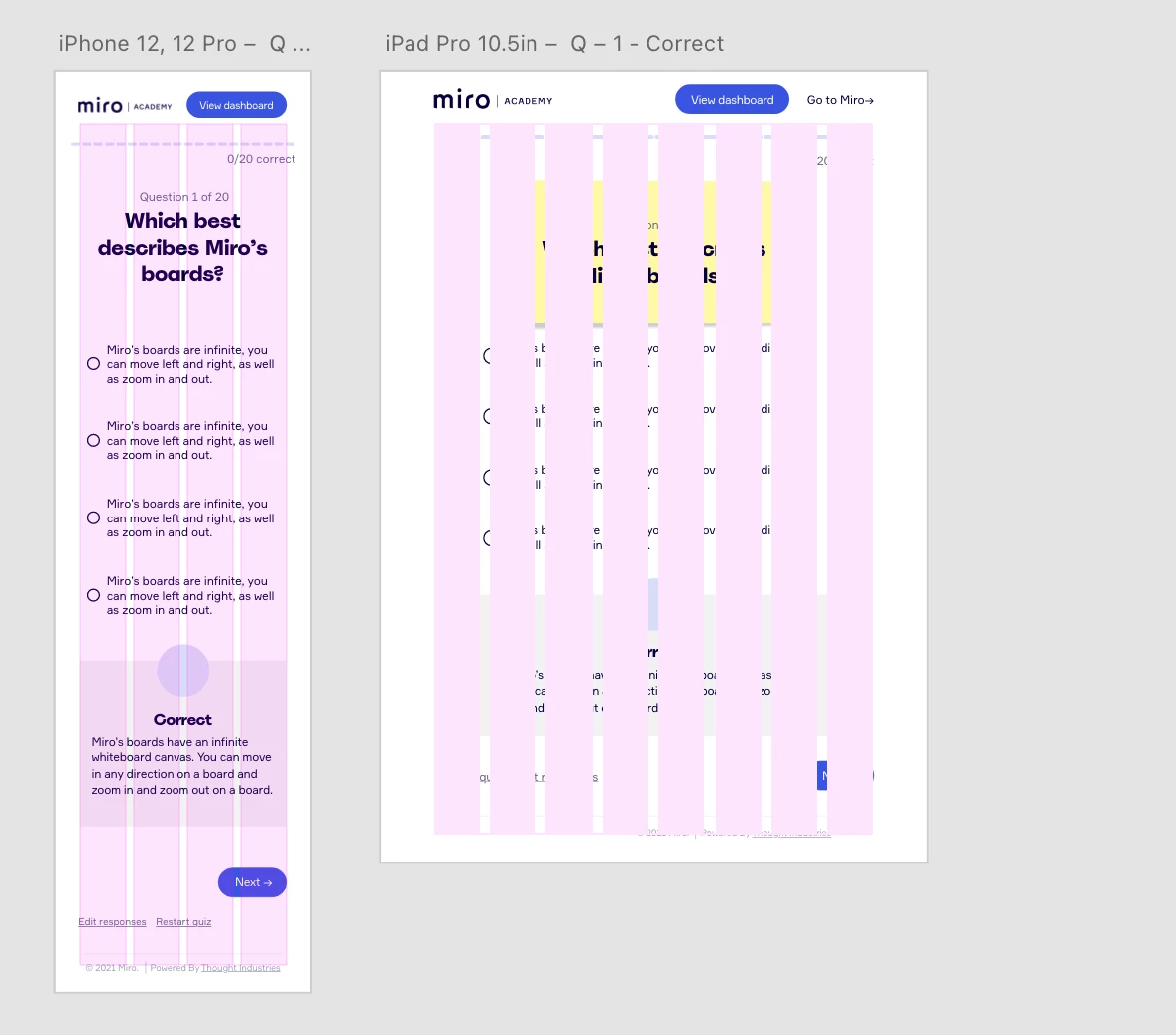
I wasn't sure if this was a known issue. I couldn't find anything on it quickly. When you're trying to change the layout color and use the color picker it breaks the layout. The layout's columns will appear over all of your board's content. This is what happened to the right board when I color picked from the board to the left. There's no way to get rid of it unesss you hit undo.
    This topic has been closed for replies.

    1 reply

    Community Manager
    November 17, 2021

    Hi,


    Thank you for posting your issue here.

    It seems when you opened the color picker, somehow the opacity got increased that's why the content of the page is not visible. Please try to decrease the opacity which is there at the right side of the color picker, and check if your issue got resolved.

    Let us know if it's helped.


    Regards,

    Abhishek Das (Adobe XD Team)

    Participant
    November 17, 2021

    Hi, that's not the case. The layout remains above all of the components on the board. If you take a look the layout on the right that is color picked but the opacity is down is above all of the components.