


Inspiring
January 3, 2017
Answered

Color picker picks up the light color in Adobe XD.

  • January 3, 2017
  • 23 replies
  • 49197 views

iOS:バージョン10.15.1

AdobeXD:バージョン 24.1.22


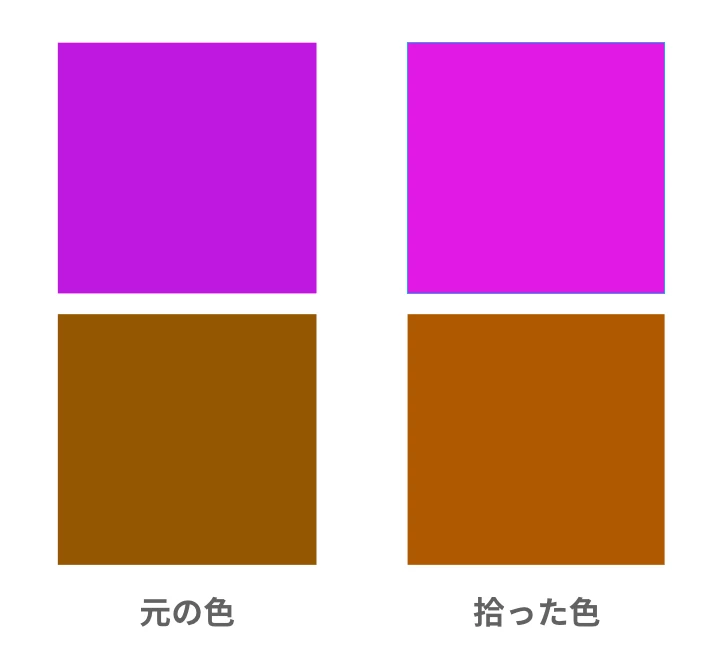
スポイトで色を拾うと少し薄い色を拾っています。

Photoshopのように細かい設定がないので、この場合はどうすればよいのでしょうか。

これから、アンインストールしてからインストールを試してみます。


Translate by mod.
When I pick up the color with a dropper, I pick up a little lighter color. Since there is no detailed setting like Photoshop, what should I do in this case?
Now try uninstalling and then installing XD app.


<The title was renamed by moderator>


Moderator notes
This post was written in Japanese. However, although many answers are received, there are no answers in Japanese.
This thread may be more useful globally than Japanese. and moved it from the Japanese community to the global community.
 

This topic has been closed for replies.
Correct answer yzrh_mine

【解決済み】


返事が早くてとても助かります。


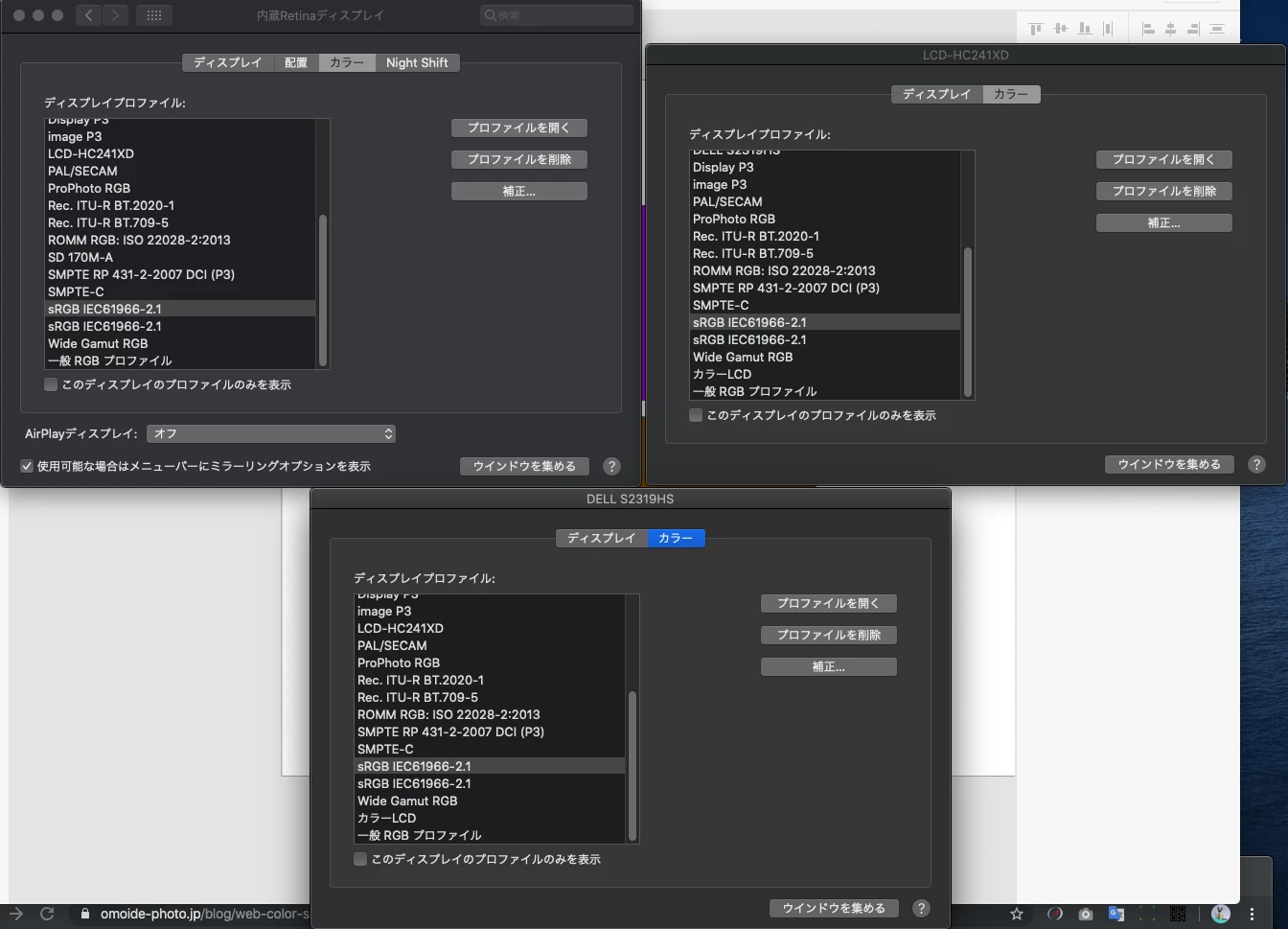
アップルの「設定」→「ディスプレイ設定」→「各モニターのカラーをsRGB」

に変更することで解決しました。

スポイトの色がモニターに起因することを初めて知りました。


ただ、今までこのバグが起きていなかったので、

アップデートで改善されることを待っています。

ありがとう。


ありがとうございました。

23 replies

Participant
February 3, 2023

Has there been any forward progress on this issue? It's been long enough to employ a fix for this hasn't it?

• Adobe XD 56.12.0.6

• MacBook Pro Built-in Liquid Retina XDR Display

• LG UltraGear 34GP83A


There are no matching sRGB profiles and frankly I don't think I need to fuss with them for the software to work appropriately. The Adobe Illustrator eyedropper works in any situation as expected and without having to make display profile changes. Is there any reason this function can't be adopted with XD?

grafikundso
Participating Frequently
August 13, 2021

solved? not for me, but why should adobe care if its really solved?...

Participant
March 31, 2021

Guys, do you know how to fix this color palette?? there is no black in my palette...

Rishabh_Tiwari
Community Manager
Community Manager
April 1, 2021

Hi Peter,


Sorry to hear about the trouble. Could you please try the suggestions shared here: https://community.adobe.com/t5/adobe-xd/color-picker-picker-not-showing-dark-colors-in-xd-on-windows-machine/m-p/11269236#M32875


Let us know if this helps or if you need any further assistance.


Regards

Rishabh

Participant
April 27, 2021

I just tried Adobe XD for the first time and immediately ran into this. I don't have time to debug software... I am uninstalling XD and switching to Figma or Sketch. I will checkm back in on XD again in a few years. Disappointing.

Participant
March 23, 2021

I'm experiencing issues with the color picker. It only shows one color no matter what. I can use the hue slider, which only shows white. See attached video.


Tried reinstalling XD, updating video drivers. Nothing seems to work. Color pickers in other apps all work fine.

Rishabh_Tiwari
Community Manager
Community Manager
March 23, 2021

Hi there,


Sorry to hear about the trouble. Could you please try the suggestions shared here: https://community.adobe.com/t5/adobe-xd/panel-color-picker-picks-up-the-light-color-in-adobe-xd/m-p/10729788#M36417


Let us know if this helps or if you need any further assistance.


Regards
Rishabh

Uplynxed
Participating Frequently
January 24, 2021

Since this is one of the top results searching for solutions to this, I'll share this here as well.

For those looking for a solution to this, here is what worked for me after 4 days of troubleshooting:


Turn off 10bit color mode, switch it to 8bit.

On windows, with an Nvidia GPU, I changed this in the Nvidia Control Panel.


The weird thing for me is that sometimes it'd work with 10bit and then the next time I'd start XD it'd break again. It seems like it is an issue with Windows 10 UWP apps in general as transparency effects in other apps using the "fluent design" framework were having similar issues as well.


Hope this helps some people out.

Participant
July 7, 2020

bug: color picker is broken, see image


Adobe XD Version: 30.2.12.3
Windows 10: 1906 (Build 18363.900)

Nvidia Graphics drivers are up to date


<The Title was renamed by moderator>

HARSHIKA_VERMA
Community Manager
Community Manager
July 7, 2020

Hi David,


Thank you for reaching out!

Sorry to hear you're experiencing issue with color picker not showing dark colors in XD. We would suggest try switching your monitor in your Display settings to sRGB.


Let us know if that helps.


Thanks,

Harshika

alexandrug40071349
Participant
September 19, 2020

I'm also having this problem. Color picker doesn't show dark colors. I can however pick any dark color except the picker shows them as white.


Latest windows updates installed, latest adobe XD, latest graphics card drivers.

I also set both of my LG gaming monitors to sRGB.


WIndows 10 Pro v 2004. OS build 19041.508

XD v 33.0.12 - not working

PS v 21.2.3 - working

AI v 24.3 - working


This however does not occur in Photoshop or Illustrator


Any other tips?

Participant
May 29, 2020

Hello,


I recently enabled 10-bit color on my display from Nvidia Control Panel to utilize it while working on certain files in Photoshop. However, when I open up Adobe XD while the 10-bit output is enabled, the colors got all weird in the color picker and it's not displaying correctly. Though, I noticed this only in color picker. Colors rendered on canvas are rendered properly I'd say. Please note that in Photoshop everything works great.


This is how color picker looks like when the 10-bit display is enabled:


Any way to fix this without disabling 10-bit colors on my graphic card?

HARSHIKA_VERMA
Community Manager
Community Manager
May 29, 2020

Hi there,


Sorry to hear you are having trouble with color picker not showing darker colors. Would you mind trying to launch your window from your native display. If that doesn’t work, you might try switching your monitor in your Display settings to sRGB?


Let me know if that helps.


Thanks,

Harshika

Popplewels
Participant
May 28, 2020

Hello I have problem in adobe XD. On my PC (nVIDIA RTX2070) the color palette is displayed as follows (see figure). it shone a month ago. I reinstalled the adobe XD and graphics drivers and nothing helped. It's very annoying and you can't work with it. I have Windows 10 completely up to date.


Please help.

HARSHIKA_VERMA
Community Manager
Community Manager
May 29, 2020

Hi there,


Sorry to hear that you are having trouble with color picker in XD. Would you mind trying the step suggested in this post: https://community.adobe.com/t5/adobe-xd/panel-color-picker-picks-up-the-light-color-in-adobe-xd/td-p/10729788?page=1?


Let us know if that helps.


Thanks,

Harshika

Monika Gause
Community Expert
Community Expert
May 24, 2020

What kind of object is selected. I'm a little confused since there is no stroke. Can you perhaps show the complete screen including the layers pnael?

Participant
May 25, 2020

Photos below, it doesnt matter what I select there is no border colors and Fill colors has no darker tones


Monika Gause
Community Expert
Community Expert
May 25, 2020
Participant
May 24, 2020

Hello, as you can see below in the photo my color palette has NO dark colors...