eug72917282
Participant
Mar 10, 2021 9:50 AM UTC
Answered

Color/transparency bug on sharing prototype in XD

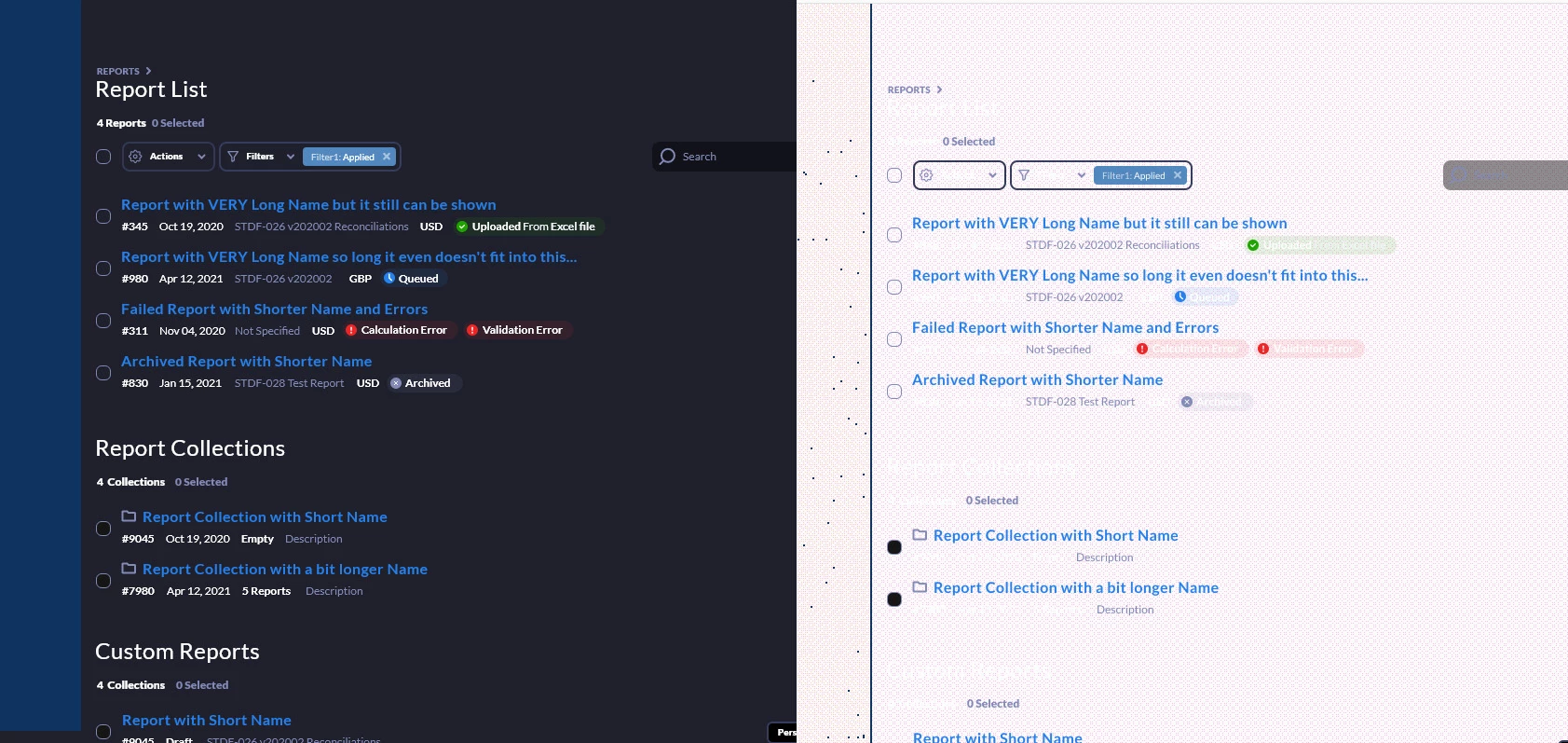
Having some strange bug while sharing prototypes after last update

Original design vs shared link
This topic is closed to new replies. Start a new post to keep the conversation going.
Harshika Verma
Harshika VermaCorrect answer
Community Manager
Apr 5, 2021 12:00 AM UTC

I can see correct design with Opera and Edge.


Hi there,


I am also able to see the design fine at my end on a windows machine. Have you tried to open the link on your mobile phone and see if it's working fine or may be on a different machine?


We will try our best to help.


Thanks,

Harshika

8 replies

Participant
Oct 14, 2021 7:44 PM UTC

I was having this exact problem and it seems that it may be related to the width of the prototype related to the preview window


Let me explain.....

When the web window is small enough that that prototype has to be scaled down slightly, it displays perfectly fine


however as soon as the width of that preview window is larger than the actual size of the prototype then the issue you were referring to appears


I'm not sure what the real fix is for this but I hope it helps!!!!

Translate
Spas K.
Community Expert
Community Expert
Oct 15, 2021 7:45 AM UTC

You are correct. It's more about the zoom percentage, rather than the width of the browser window. If I'm not mistaken, users have reported that on any percentage other than 100% it looks fine.

Translate
Community Manager
Mar 10, 2021 11:22 AM UTC

Hi there,


Sorry for the inconvience you are facing. I would need some more information about the issue:

1. Which OS are you using? Mac or Win.

2. Is it in all browsers or in only a specific browser?

3. Would you please send us the prototype link and the file if possible. It will help us understand the issue better.


Regards,

Jagriti Kashyap

Translate
eug72917282
Participant
Mar 10, 2021 12:02 PM UTC

Hi, thanks for quick reply

1. Windows

2. Chrome and Edge

3. https://xd.adobe.com/view/2f653a87-5d58-48bf-8714-769b83b5e3d8-7a36/


I think, shadows on components may be causing this bug

Thanks 🙂

Translate
Spas K.
Community Expert
Community Expert
Mar 14, 2021 8:03 AM UTC

This has been around for a while. Seems that it happens on certain browser / hardware combinations. If you copy these artboards to a new file and make a new prototype, do you still get the problem, or is it limited to just this file / prototype?


What made you think it's caused by shadows? Did you do some experiments to test that out?


I personally see no issue in the prototype you shared on Windows 10 / Edge.

Translate

