


Participant
October 29, 2020
Question

Colours not displaying correctly.
  • October 29, 2020
  • 1 reply
  • 1115 views


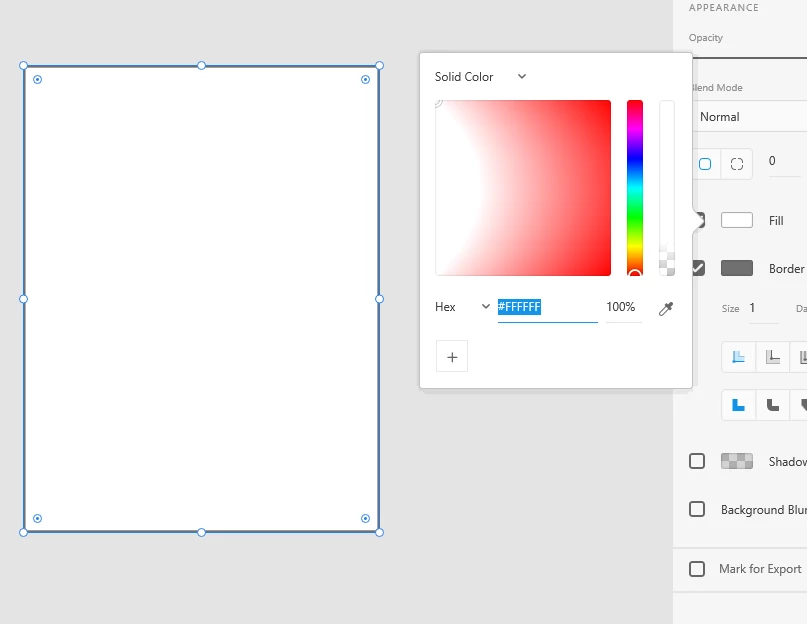
I've been having this issue with my Windows Pc when it comes to displaying the gradient of colours in the picker. I use XD on my mac for work and have not come across this issue but on my PC at home I am having this issue. 

I have already uninstalled XD and reinstalled but the problem has not gone away. How can I fix this? 

When I choose a Fill colour I see the image above. When choosing a border colours thepicker is completely white. 


    This topic has been closed for replies.

    1 reply

    Harshika Verma
    Community Manager
    Community Manager
    October 29, 2020

    Hi there,


    Sorry to hear you are experiencing the issue while using color picker. We had a similar discussion regarding this here: https://community.adobe.com/t5/adobe-xd/panel-color-picker-picks-up-the-light-color-in-adobe-xd/td-p/10729788?page=1 Could you please try the workaround suggested in the correct answer of the post and see if that helps?


    Thanks,

    Harshika

    Ross5C19Author
    Participant
    October 30, 2020

    Hey Harshika, 


    Thank you for your reply. Unfortunately in the above link that work around does not work. 

    I use a Mac for work with an external display. Adobe XD works fine on this external display on Mac
    I have connected my Window 10 PC to the same display and I am still seeing the colour gradient palette as below. 


    1. Solid Colour Fill
    2. Linear Gradient Fill

    3. Radial Gradient Fill

    4. Border


    As you can see the colours are not displaying correctly in the pop out palette. Making this very difficult to select a colour unless I know the specific # value.