
andrewh95463792
Participant
March 11, 2019
Answered

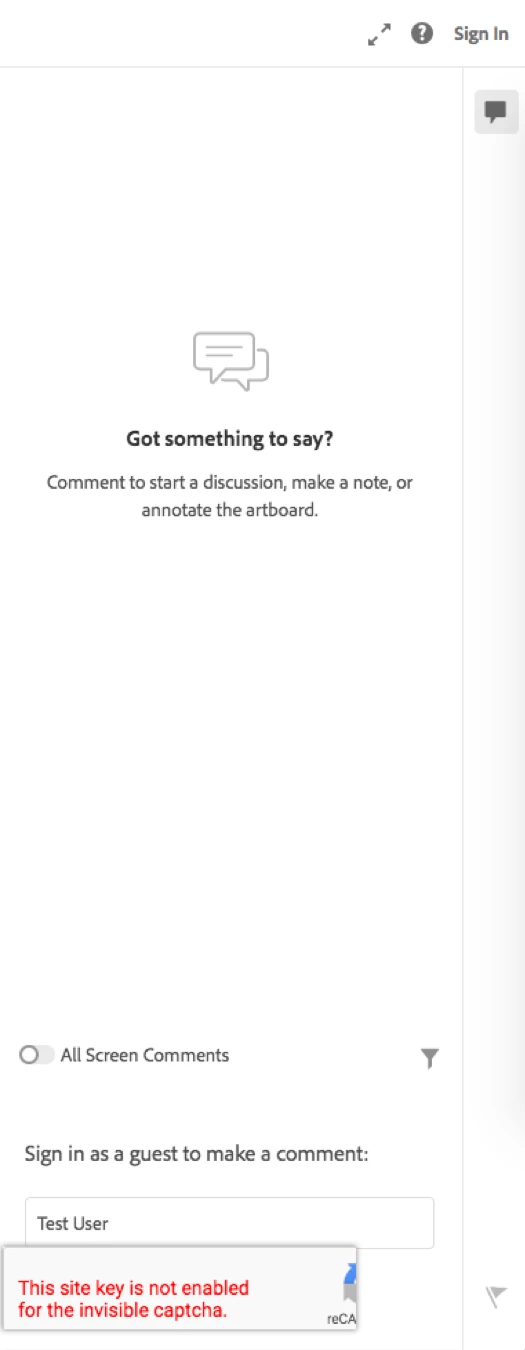
Comment as Guest - Recaptcha Issue

  • March 11, 2019
  • 1 reply
  • 1180 views

Hey there!

We've published a course for review and we're having some outside clients look at it by using the 'Comment as Guest' feature when reviewing an AdobeXD. The issue is, we are getting a recaptcha error that says "This site key is not enabled for the invisible captcha." and it wont allow the reviewer to submit their name and move on to be able to comment. Any ideas on how to fix this?
This topic has been closed for replies.
Correct answer ArunKaza

Hi Andrew and Marissa,

Apologise that Guest commenting was not working when you tried on Prototype links. We identified a bug on our end that was causing this momentarily and have addressed it now.

Can you try reloading the same link in your browser and check if you can comment back as Guest?

Kindly confirm if its working for you now.

Best,

Arun

1 reply

Atul_Saini
Legend
March 11, 2019

Hi Andrewh and Marissan,

Sorry that your clients are unable to share comments as a guest because of this  Recaptcha issue. I would like to know the version of Adobe XD which you are using and the browser on which you have opened this prototype. I would also like to know if you have tried in on a different browser?

Please try open this prototype on a different prototype as well. Awaiting your response.

Thanks,

Atul_Saini

marissan90109223
Participant
March 11, 2019

Hi!

I tried both chrome and safari to see if that would solve the problem. The version I am using is 16.0.2.8. My coworker is having the same issue as well. His XD is updated to the latest version as well.

We have tried it on a couple different files and nothing is working.

Hope this helps.

-Marissa

Atul_Saini
Legend
March 11, 2019

Thanks for the details, could you please share the link of the prototype in a private message to me so that I can investigate more on it?