Participant
July 8, 2020
Answered

Component Issue Multiple component to make one component use

  • July 8, 2020
  • 1 reply
  • 676 views
Yellow color is click able you click then open popup and cancel button and save button click to close popup but issue is other componet not working cancel and save button not working mean location popup not working and open promo days popup its working but every popup not working please help me  Thanks in advance    https://xd.adobe.com/view/971fb8db-41f5-4b0a-b77b-d24a2a72e38a-c24c/ 

    This topic has been closed for replies.
    Correct answer Shwetha Diwanji

    Hey Noman,


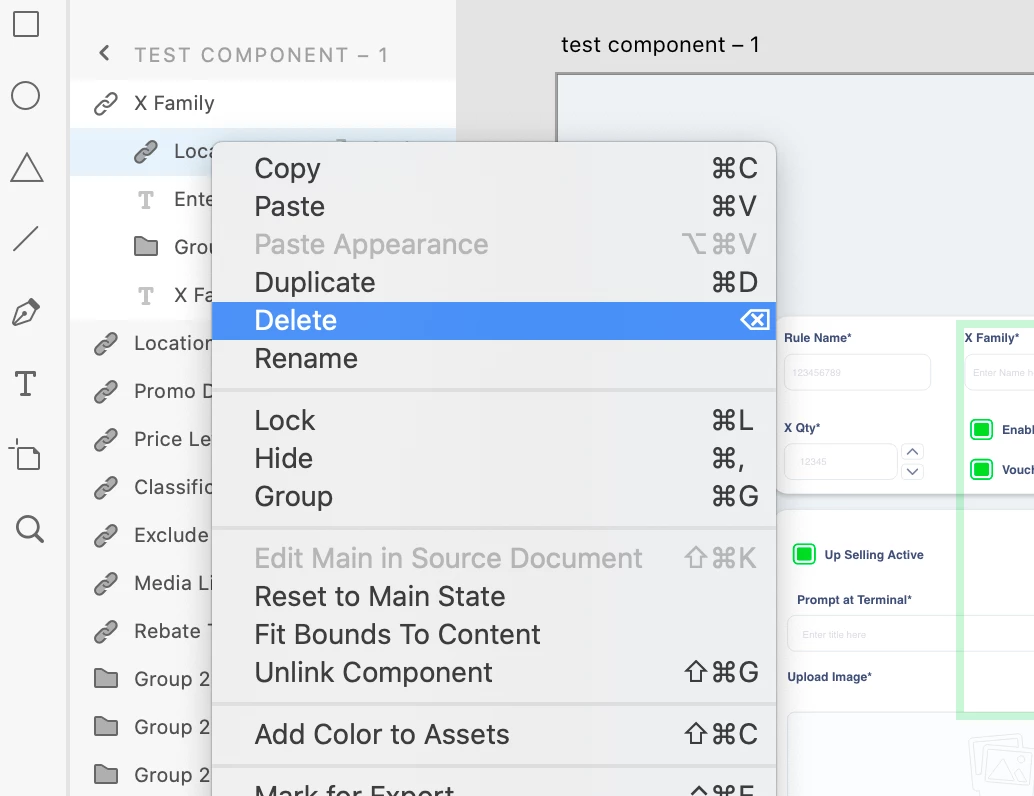
    Sorry to keep you waiting. The issue you're facing is because you have included all the dropdown components in 'X family' component but have added only one popup state. If you expand 'X Family' component in layers panel and delete 'Locations' component inside it, you should be able to click and dismiss all the dropdowns. Thanks.


    Regards,

    Shwetha Diwanji

    1 reply

    Shwetha Diwanji
    Community Manager
    Community Manager
    July 8, 2020

    Hi Noman_Shahid,


    Sorry to hear that you're facing issues. Is it possible to share the XD file with us so that we could take a look at which interaction is causing the issue. Thanks.


    Participant
    July 8, 2020

    https://we.tl/t-bEkgbtKI1Y this link download my file please 

    Shwetha Diwanji
    Community Manager
    Shwetha DiwanjiCommunity ManagerCorrect answer
    Community Manager
    July 21, 2020

    Hey Noman,


    Sorry to keep you waiting. The issue you're facing is because you have included all the dropdown components in 'X family' component but have added only one popup state. If you expand 'X Family' component in layers panel and delete 'Locations' component inside it, you should be able to click and dismiss all the dropdowns. Thanks.


    Regards,

    Shwetha Diwanji