

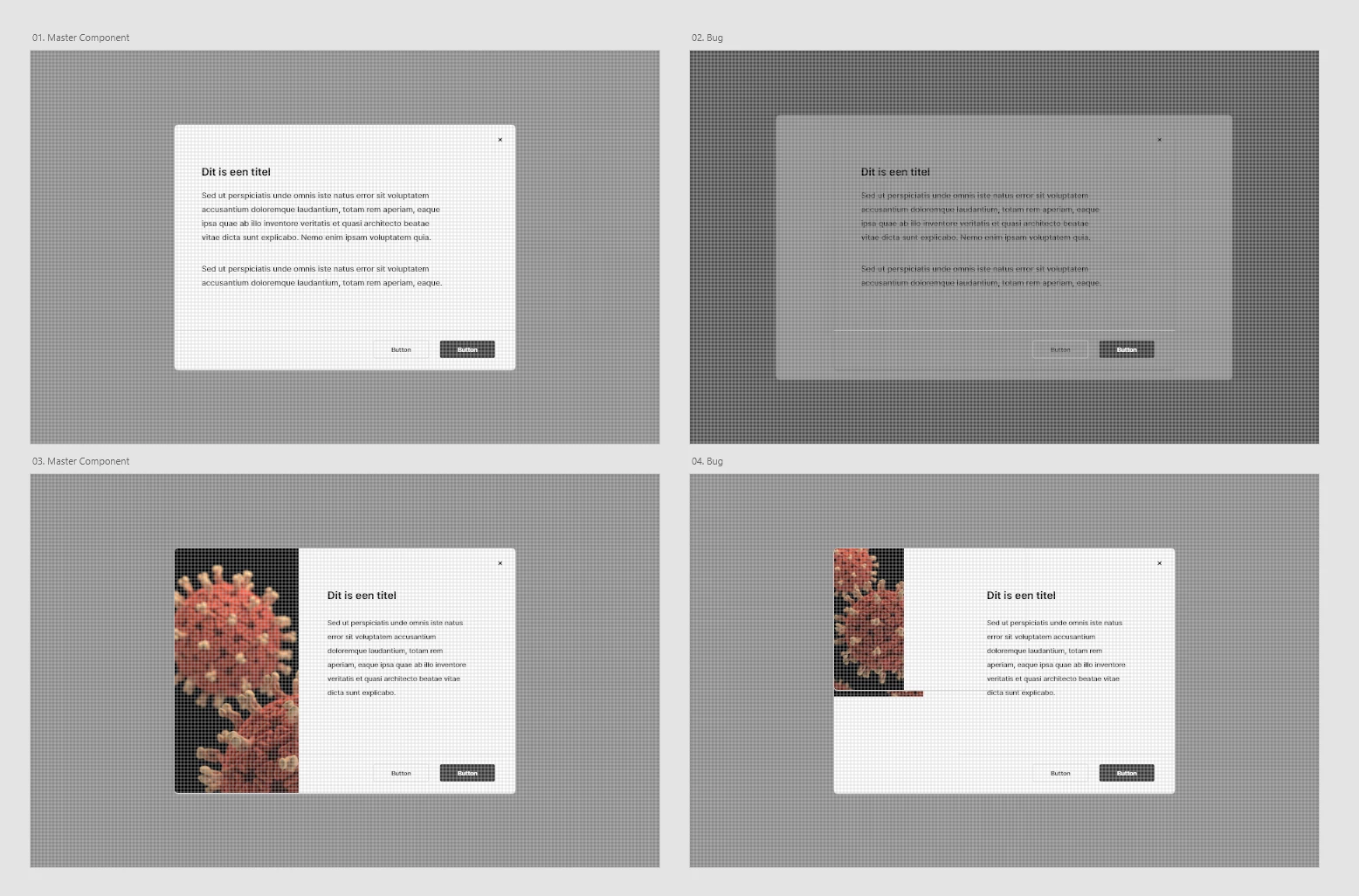
Components within other components in them causes XD to display the layers incorrectly.
Hi there forum,
I've been trying to integrate the use of components in Adobe XD in the design process of the company I work at. I used to work with Sketch for years and their tool is great for creating consistensy in design and brand guidelines through the use of a Symbol Library. I've been trying to implement the same way of working in Adobe XD, by applying the Atomic Design Methodology by Brad Frost in a Component Design Library. After hours of effort creating a default version of this Library, I noticed that using serveral layers of components in other components (Atoms in Molecules in Organisms, see Atomic Design for explanation) causes Adobe XD to mess up the layers and randomly duplicating deeper layers of components in other components (see video's for visual explanation on the issue).
Dropbox: adobe-xd_components-library.mp4
Dropbox: adobe-xd_components demo.mp4
Is this something that Adobe is aware of, because this makes the whole idea of having components pretty useless to us.
Software information
Adobe XD version: 27.2.12 (issue was excisting in previous versions though).
System information
Windows 10 Enterprise (2019) version: 1909.
Intel Core i7-8750CH CPU @ 2.20GHz
16.0 GB RAM
Thanks in advance.
Kind regards,
Mike
 AdChoices