jeelleenaaa
Participant
March 16, 2021
Answered

Convert to path

  • March 16, 2021
  • 2 replies
  • 1857 views

Hello,


I've updated app today and convert to path is gone somewhere? Thanks in advance.
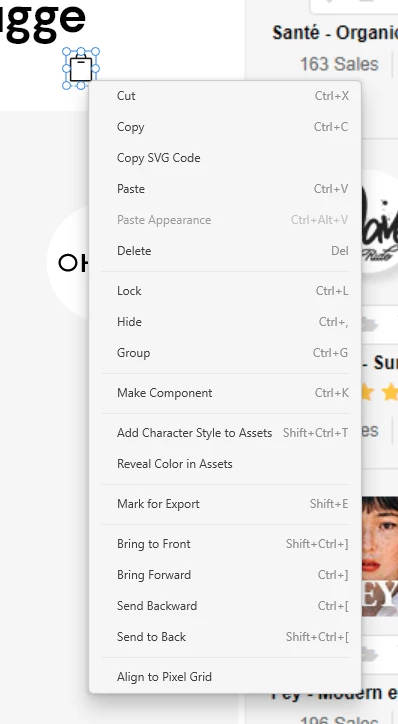


    This topic has been closed for replies.
    Correct answer elainecc

    This looks like you haven't actually drawn the circle inside of XD, but instead copied it or imported it from another surface (like Illustrator). In this case, it looks like you  might actually have a different type of shape and not a natively drawn circle in XD. The latter will resize without scaling the stroke. If you're seeing a resize with a scaling of stroke, chances are you actually have a complex path already, and you're scaling it.


    If you draw a circle in XD and resize it, does it do what you're looking for?

    2 replies

    elainecc
    Community Manager
    Community Manager
    March 16, 2021

    Hi there! We actually moved this from the context menu and into the new top level menu, as @Rishabh_Tiwari mentioned. Hope that helps!

    jeelleenaaa
    Participant
    March 18, 2021

    But what about this? I want to scale this circle proportionally but it changes the thickness of my stroke, and I can't convert it to a path to prevent that?

    HARSHIKA_VERMA
    Community Manager
    Community Manager
    March 19, 2021

    Thanks for sharing the screenshot. Would you mind double-clicking the object or selecting the circle from the layer panel and then see if you get the option to "Convert to Path"?


    Thanks,

    Harshika

    Rishabh_Tiwari
    Community Manager
    Community Manager
    March 16, 2021

    Hi there,


    Thanks for reaching out. I tested this on my end and I am getting the option for "Convert To Path", so could you confirm the version of XD and please share more details about the object on which you are trying to "Convert To Path". 


    Regards

    Rishabh
