Participant
February 10, 2020
Answered

[Crash/Load]-Adobe XD freezes during the zoom operation.

  • February 10, 2020
  • 18 replies
  • 14608 views

Hi,

XD seems to be freezing whenever I try to zoom in. I am required to restart the program everytime this happens.

Looking forward to the bug being fixed.


Thank You.


<The Title was renamed by moderator>

This topic has been closed for replies.
Correct answer HARSHIKA_VERMA

1. Adobe XD is updated. Windows 10.

2. Yes, I have two monitors but using the main one for XD.
3. Wacom is updated. Also, Nvidia drivers are also updated.

The bug is still there.
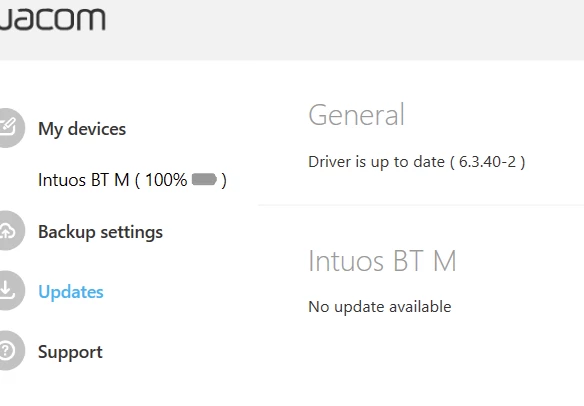


Thanks for sharing the information asked by Rishabh, Serhii.  As far as I know the bug was fixed with XD 31 version. If you're still running into the same issue. We would need some more specific information so that we can reopen the logged bug.


  • Does it always freeze on zoom (or only sometimes)?
  • How was the zoom command given (using mouse wheel, the touchpad, the zoom dropdown, the zoom tool or a specific keyboard shortcut (like Ctrl+1 etc.))?
  • I am unable to find the logs with the name in the screenshot. Could you please try uploading the logs again to the shared location such as Creative Cloud or Dropbox and then share the url with us over a private message?


We will try our best to help.


Note: Please share the url of the post over a PM for reference.


I am also merging the post with the similar discussion happened in past. 


Thanks,

Harshika

 

18 replies

ilia vikulov
Participant
April 24, 2020

Hello! 
I started to experience the same bug today unexpectedly. I've been working for 5 hours and then it started freezing. 
It freezes instantly if I zoom, but even if I don't it freezes after ~5 seconds. 
It's only cloud documents that are freezing. 


I tried to open a local document on my PC and a cloud document, I quickly pressed ctrl-a ctrl-c in the cloud document, then went to local and pressed ctrl-v, it pasted all the content but the artboards. 

When it freezes it sits on 0.1% cpu load, 700MB RAM load, so nothing critical, it doesn't say that it has issues, just freezes and does not repond to anything. It's the cloud document that is frozen, local document proceeds working.

I have acer swift sf314-56 laptop with latest windows update. (i5, 8gb of ram, integrated graphics)
Would be nice to have an option to roll back an update or something like that...


P.S. I've been doing a lot of line work in one artboard, playing with shapes, with a lot of crazy color gradients, then I left it, it must have saved to cloud and then problems started. Quickly deleting said artboard doesn't fix the issue and I don't fix it's the reason why other documents are crashing.


EDITED: 23 minues after posting this everything is working ok. 


Kind regards,

Ilia Vikulov

Participant
April 24, 2020

Same Happens to me as well. 

I'm going nuts. I was in the middle of a deadline project. 

ilia vikulov
Participant
April 24, 2020

My project is working okay right now, how is yours?

Participant
April 24, 2020

I experience a problem that many members lived. My adobe XD keeps freezing right after a zoom operation. It was working in the morning. It started to crash when I opened a new document simultaneusly, now I can't work even with one file. 

My OS is windows 10 

XD is up to date. (Uninstalled and reinstalled)

What shall I do?

My PC: 
intel core i7-10510U 1.80 Ghz

8 Gb Ram

With Intel UHD Graphics

Everything is updated. 

HARSHIKA_VERMA
Community Manager
Community Manager
April 24, 2020

Hi Danireytan,


We are sorry to hear you are having trouble with XD freezing after zoom operation and thank you for trying the troubleshooting steps. We would like to know a few more details in order to investigate the issue-


  • The screenshot of your about XD info page.
  • Please generate the log files using this link: https://helpx.adobe.com/in/creative-cloud/kb/cc-log-collector.html and upload the file to a shared location such as Creative Cloud app or Dropbox and share the url with me over PM.
  • Please share the operating system build you're using. 


Note: Please share the link of the post over PM for reference.


We will try our best to help.


Thanks,

Harshika

Whimsical_curiosity5EAC
Participant
April 14, 2020

Help I am having exact issue as well Adobe XD and Photoshop is crashing when  I use zoom. All my adobe and video card are update to the latest version. It has been happening since January.

Rishabh_Tiwari
Community Manager
Community Manager
April 16, 2020

Hi there,


Sorry to hear about the trouble. Could you please confirm the version of Adobe XD and the Operating System? Also please confirm if this happens on a specific file or multiple files? 


Regards

Rishabh

Participant
March 29, 2020

Hello Adobe XD team. 


Wheni work on projects in XD on my windows computer, it keeps freezing anytime I try to:

1) Zoom in or out.

2) When it is saving to the cloud.


Any remedy to this problem?


Looking forward to hearing from your guys.


{Renamed  By MOD}

Rishabh_Tiwari
Community Manager
Community Manager
March 30, 2020

Hi there,


Sorry to hear about the trouble. I'd request if you can share a few more details like:


  1. The version of Adobe XD and version of the Windows Operating System.
  2. Does this happen on a specific file or multiple files?
  3. Please check if your system's graphics card drivers are up to date as per the manufacturer's website?
  4. You can also try re-installing the Graphics Driver and then reboot your machine and check again.


Regards

Rishabh

Participant
March 1, 2020

Since the last two updates I´ve been having this trouble...When I zoom in the program freezes, it kind of looks pixelated the work station and stop working.

So to keep working I have to close the program and open it up again but later on I have the same trouble.

Sjaani
Community Expert
Community Expert
March 2, 2020

Are your Windows and XD versions both up to date?
Windows10: 1909
XD: 27.1.12.4


Known Participant
May 8, 2020

I have same exact issue, updated windows 10, updated drivers, update graphics card driver (GTX1060) always when moving and panning usually zoom in / out. I find i do this a bit as sometimes zooming in one degree zooms right in and you click zoom out a few times in a row.

AMircea
Participant
February 25, 2020

XD keeps freezing, and it's geting worse and worse.


- it happens on all projects, either from the cloud or from my computer, on small (10 page wireframes) or bigger projects (100 page designs)

- I am on Win 10 64-bit, my laptop is a Lenovo, processor: Intel Core i7-9750H, CPU @2.60GHz, 32 GB RAM. It's a high end laptop, so obviously my specs are not the issue.

- windows and drivers are all updated

- Adobe XD version: 27.1.12.4 , Creative Cloud Sync: 4.3.28.24, but this happend to previous versions as well. It just keeps getting worse though.


Fortunatelly, only the canvas freezez, so I can still save the file. I save the file, close XD, then open again, and everything's fine. Then some time later it happens again. It's annoying to keep having to shut it down and open again several times per day. In the past few months it was maybe once or twice per day, but now is at least 10 times per day. Usually it happens whenever I zoom in/out, or pan the canvas, sometimes when I'm in the Prototype or Share panels, but I can't say there is a pattern to it.


Need this fixed please! Thanks.


<The Title was renamed by moderator>

Participant
February 26, 2020

I (and a coworker) are having the same issue. it happens at least once a day that XD freezes and I need to restart XD. We are on windows 10. I have a brand new Windows Laptop and everything is up to date. I can't find anything addressing this issue.

italosan
Community Expert
Community Expert
February 14, 2020

Hi, what version of Adobe XD are you using? Could you list the features of your computer?

zaidaliAuthor
Participant
February 17, 2020

XD should be the latest version (27.0.12).


Features:

-  Intel Core i7- 7500U CPU @2.70 GHz.

-  16 GB Ram.

-  Nvidia GeForce 930MX.

italosan
Community Expert
Community Expert
February 18, 2020

Have you checked if there are any updates available for your OS and graphics card?

Known Participant
February 10, 2020

I recently updated to V26 of XD and have been experiencing a lot of strange UI and interface issues. The most common one seems to be when I try to zoom in to one of my projects.


Steps to reproduce:

  • Open an XD document with multiple artboards (mine had 17)
  • Zoom out to ~2% zoom
  • Attempt to zoom back in


Expected result:

  • document zooms in and remains functional


Actual Results:

  • The interface does not zoom in
  • interface becomes unresponsive, except for tool bar/asset panel
  • user can switch between assets/layers but can't select anything
  • project elements (text, components, boxes) become unresponsive
  • User can switch tools via the left toolbar panel, but unable to use any of the tools


The only fix so far is to close and re-open the document. Additionally I can't always reproduce this successfully with the steps above, but it has occurred with enough frequency that I believe it to be a real issue.


Thanks,

B

<The Title was renamed by moderator>

HARSHIKA_VERMA
Community Manager
Community Manager
February 12, 2020

Hi Bardia,


We apologize for the bad experience and thank you for sharing the details. We have a latest release of XD version 27. Would you mind updating again to the latest version of XD? 


Let us know if you experience the same issue on XD 27. We will try our best to help.


Thanks,

Harshika

Known Participant
February 21, 2020

Hi Harshika,


Thanks for your response. I updated to version 27 last week, I wanted to wait to respond to confirm the issue was resolved.


At first, it seemed the issue was resolved. Unfortunately, after a short while, the same problem began again. I notice it tends to lock up when I zoom in a few consecutive times (either with ctrl + or with the mouse).


Is there anything else I should try? Would my log files be helpful?


Thanks,

B