


Participant
September 16, 2023
Question

Creating Conditional Interactions

  • September 16, 2023
  • 1 reply
  • 989 views

Hi,


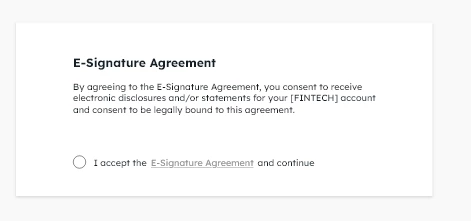
I'm prototyping a design that requires logic rules added to it. For example, a radio button accepting terms of service cannot be cclicked until the link has been clicked to read the full terms of service (example bleow). I cannot find any information on how to accomplish this. If anyone can point me to a resource demonstrating how conditions may be added to an interaction I'd super appreciate it
 

    1 reply

    AkinGn
    Community Expert
    Community Expert
    September 17, 2023

    Hello @verkstadpdx, I think I'd resolve this in 2 artboards: The first artboard would have the radio button as a static/non-clickable element, that way even if user clicks it, it wouldn't have any interactions. In this first artboard, the only interactive element would be clickable "e-signature agreement" link. When user clicks that link, I'd take the user to the second artboard, which has the radio button as a clickable element.

    (I know it's not very easy to accomplish this without having conditionals like Figma has, but I previously did for a "wrong/right" answer situation, taking user to different artboards with the same submit button, depending on the previously clicked item, which can be seen here: https://www.youtube.com/watch?v=yDFVcSVaUrg Adapting this method to your example, you can show the user a second version of the radio button, which is clickable, that way you could achieve that in a single artboard, by making all of the elements a single component.) Hope this helps!

    Participant
    September 25, 2023

    Thank you for getting back to me. I ended up creating a workaround much like you suggested complemented by a screenshare video that explained the steps in real-time. Client was fine with that approach

    AkinGn
    Community Expert
    Community Expert
    September 25, 2023

    Oh that sounds like a great way to demonstrate, happy designing!