
Participant
August 4, 2020
Question

Creating Tabular Data

  • August 4, 2020
  • 2 replies
  • 784 views

Hi all,

I am very new to Adobe products and my background with graphics is more Paint.NET.

I want to understand how to create tables in XD.  Its something so common in layouts, yet somewhat frustating.


Question - what is the easiest way to do tables.


For my current incarnation I am using Stack feature.
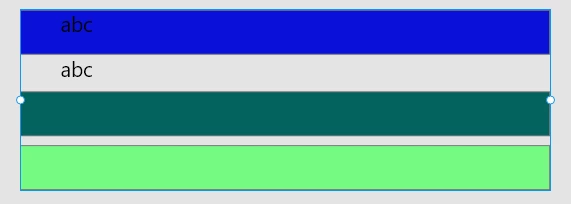
This is being created in the Pasteboard.
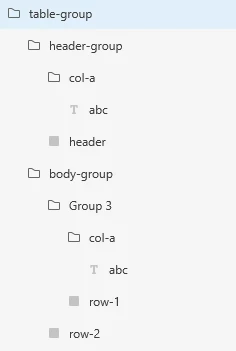
The table-group grouping works well.  It is a vertical Stack.  This is the blue row.


header-group is just a plain old grouping consisting of a group (col-a) and a rectangle (header).  This arrangement allows me to change colour of the header row independant of mucking up group colours.


Group3 us meant to be a row with text in.  I cannot position row-1 for the text to appear like the header.  And this is causing me a headache.  It all looks the same as the header-group.

 

Its frustrating when I change a text colour in a Text then change the group colour - wiping out my text colour.  So if I changed col-a Fill, then it will cascade over the top of the underlying text.


Am I doing something wrong?  Can anyone please give me some good tips and advice to get the most out of this feature, or suggest better ways to do it?


Thanks


Paul


This topic has been closed for replies.

2 replies

geoffreyn49540042
Community Expert
Community Expert
May 10, 2022

Hi Paul,


I have developed a plugin that can help you. It generates data tables in afew seconds either using dummy data or real data from a CSV file. Try it out and let me know what you think.


https://youtu.be/X1NIxnSaWH4

Rishabh_Tiwari
Community Manager
Community Manager
August 4, 2020

Hi there,


Thanks for reaching out. For more information on Stack feature, you can refer to this article: https://helpx.adobe.com/xd/help/create-dynamic-designs-with-stacks.html


Regarding color fill, once you have applied a fil for the column you can still change the color of the text. To change the color of the text, double click on the text, and then select the fill. Let us know if this helps or if you need any further assistance.


Regards

Rishabh

Andez2000Author
Participant
August 5, 2020

Hi Risgabh,

That is one of the first articles I saw.  It doesnt cover my pain points I am having.  It would be nice to see an article that would cover the scenario of creating a data grid from scratch.