
FrancoBits
Legend
January 28, 2020
Question

[Design]-Component changing boundaries when adjusting states in XD.

  • January 28, 2020
  • 1 reply
  • 571 views

I'm creating a treeview component and I'm often adjusting two states that I have.

Sometimes, when changing back from one state to another, it appears duplicated groups and sometimes it shows the component's limit way off.


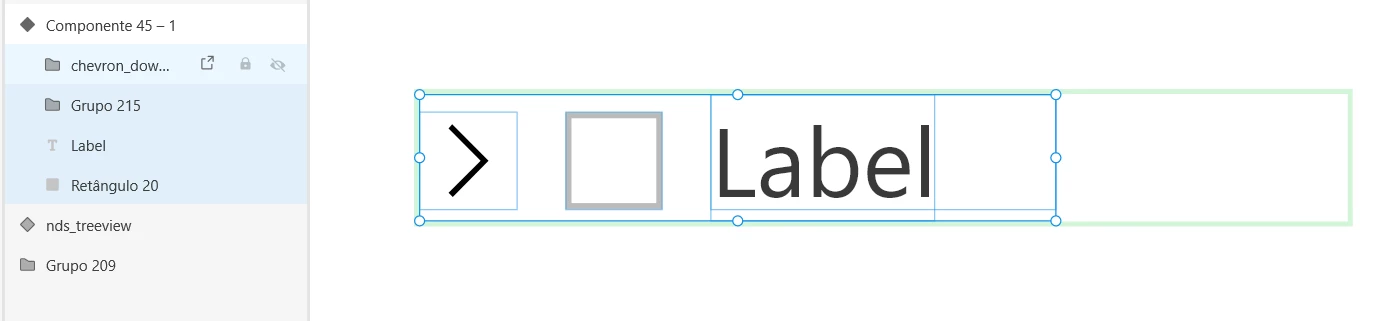
For example, I have this component with a chevron, a group of hidden subitens, label and checkbox. As shown in the screen capture, I opened the component and selected all the elements, but it shows it's limits incorrectly.
 

<The Title was renamed by moderator>

This topic has been closed for replies.

1 reply

Harshika Verma
Community Manager
Community Manager
January 28, 2020

Hi FrancoBits,


Thankyou for reaching out and using Adobe XD. We would request you to please share the OS and XD version of your machine. Is it happening with this specific component or all the components? Would you mind creating a new component and let us know if that helps?


Thanks,

Harshika

FrancoBits
Legend
January 28, 2020

Hello Harshika!

I'm using Windows 10, XD version 26.0.22.


This kind of problem is happening frequently lately. Sometimes it's the boundaries, sometimes the position of the elements of a component's state changes, sometimes it happnes to appear elements again (deleted or in the clipboard, maybe).


When it happens again, I'll try to save the file and share with you.


I had to delete the state and build it again to fix it.

Harshika Verma
Community Manager
Community Manager
January 29, 2020

That's strange and thanks for sharing the additional information. Please share the video of the workflow whenever it happens next so that we can investigate about the issue. We are sorry for the inconvenience.


Thanks,

Harshika