
Participant
January 19, 2020
Question

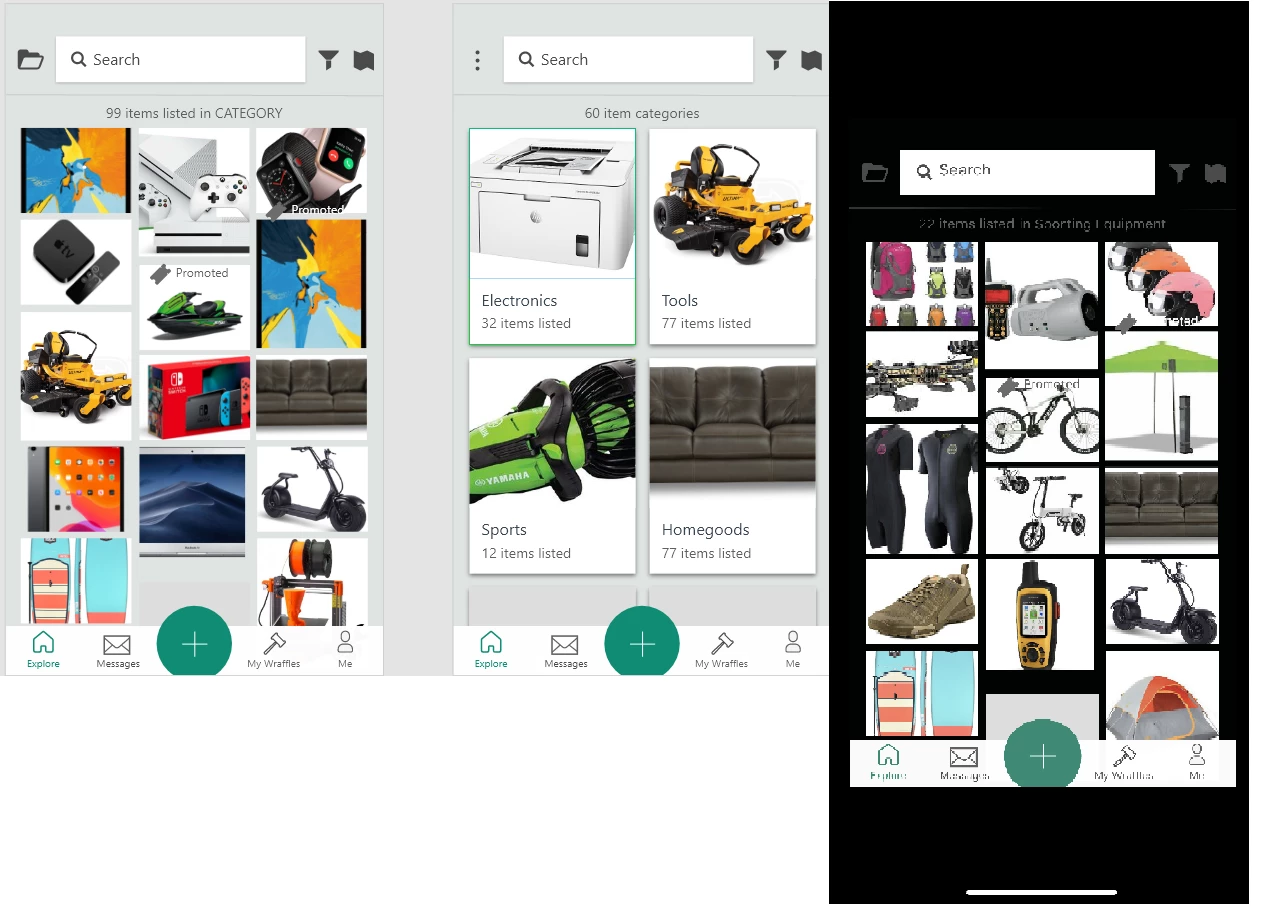
[Design]-When viewing on mobile, app is not full screen and background is black, not white in XD.

  • January 19, 2020
  • 2 replies
  • 3016 views

See below. 


Right is on my phone using xD and left is what I see in xD on my desktop. 


I am using an XS Max, but my partner is using an Iphone 11, non max and it does the same thing.


Any ideas? 


<The Title was renamed by moderator>

This topic has been closed for replies.

2 replies

Spas K.
Community Expert
Community Expert
January 20, 2020

Do you have a background color set on your artboards? You can select the artboard in Xd by clicking on its name, and check if you have a color in the "Fill" property on the right. If the "Fill" box isn't checked and a background color is not set, the background is transparent, and that's why it shows differently on your phone. If the images on the left are from Xd, that seems to be the case, as the transparent background looks grey in Xd.


P.S. About the prototype not being fullscreen, I'm on Android, but it probably works the same. If your artboard is smaller than the resolution of the phone, it will show in its actual size, so it won't be fullscreen. For fullscreen, the artboard must be as big or bigger than the screen res of the phone you're previewing on.

Participant
January 20, 2020

There is a fill color selected on all of them... I changed it to a different color and it didn't have any effect.


And 10-4 on the resolution. I had someone do the original artboard layouts for me and he did them in the wrong resolution so I am screwed there. Didn't realize it until the 50+ screen was finished. Lesson learned. 🙂 This is merely for a proof of concept demonstrable version... I'll hand what I did off to someone else to revise the screens 


Any thoughts on the background tho?

HARSHIKA_VERMA
Community Manager
Community Manager
January 20, 2020

Hi there,


Thank you for reaching out. In addition to what Italo and Dstoic has said, it looks like this is what you are referring to: https://adobexd.uservoice.com/forums/353007-adobe-xd-feature-requests/suggestions/31055587-background-color-on-fullscreen-prototype-should-be? If so, please submit your feedback and upvote the request to add your voice.


Thanks,

Harshika

italosan
Community Expert
Community Expert
January 20, 2020

Hi, could you post a screen or a short video of your work environment on Adobe XD? It would help us a lot in identifying the problem.

Participant
January 20, 2020

Sure... I just learned how to use this last week... so Id venture to guess I'm doing something wrong.


Also... there are quite a few more screens, 50 actually... I just cropped them out as these are the ones giving me crap.


Spas K.
Community Expert
Community Expert
January 20, 2020

The "Fill" color seems to be transparent. Click on that checkers pattern and bring the alpha up (the vertical slider next to the one for hue), or simply type 100% next to the color code. That's why the background color doesn't show up on the phone.