Participant
December 28, 2020
Answered

Designing artboard for a specific model

  • December 28, 2020
  • 2 replies
  • 491 views

I have to design an app for a specific tablet (Samsung Tab Active Pro: 1920 x 1200 (WUXGA)) that is not in the default artboards of Adode XD. What can I do?

    This topic has been closed for replies.
    Correct answer Chris W. Griffith

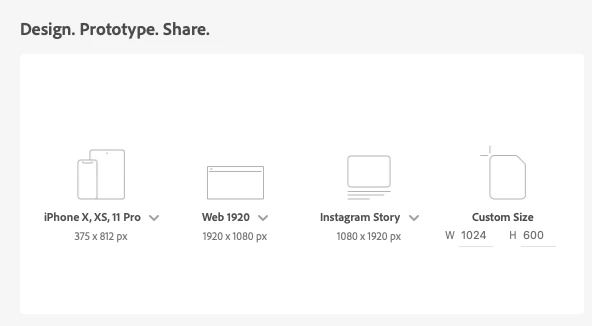
    Use the Custom Size option :). I have mine set to a custom size of 1024x600. Enter your values and click the icon to create an artboard.

    You can always resize an artboard once it had been created using the properties panel.

    2 replies

    Rishabh_Tiwari
    Legend
    December 28, 2020

    Hi Andrea,


    Thanks for reaching out. As of now, we don't have the default artboard of Samsung Tab Active Pro in the list, however, you can create a customized artboard in Adobe XD. For more information, please refer to this article: https://helpx.adobe.com/xd/user-guide.html/xd/help/get-started-with-artboards-in-XD.ug.html


    Regards

    Rishabh

    Chris W. Griffith
    Community Expert
    Chris W. GriffithCommunity ExpertCorrect answer
    Community Expert
    December 28, 2020

    Use the Custom Size option :). I have mine set to a custom size of 1024x600. Enter your values and click the icon to create an artboard.

    You can always resize an artboard once it had been created using the properties panel.