
Inspiring
Sep 12, 2022 4:12 PM UTC
Answered

desktop preview and published link behave differently

I've been battling with this for far too long and it's really frustrating.

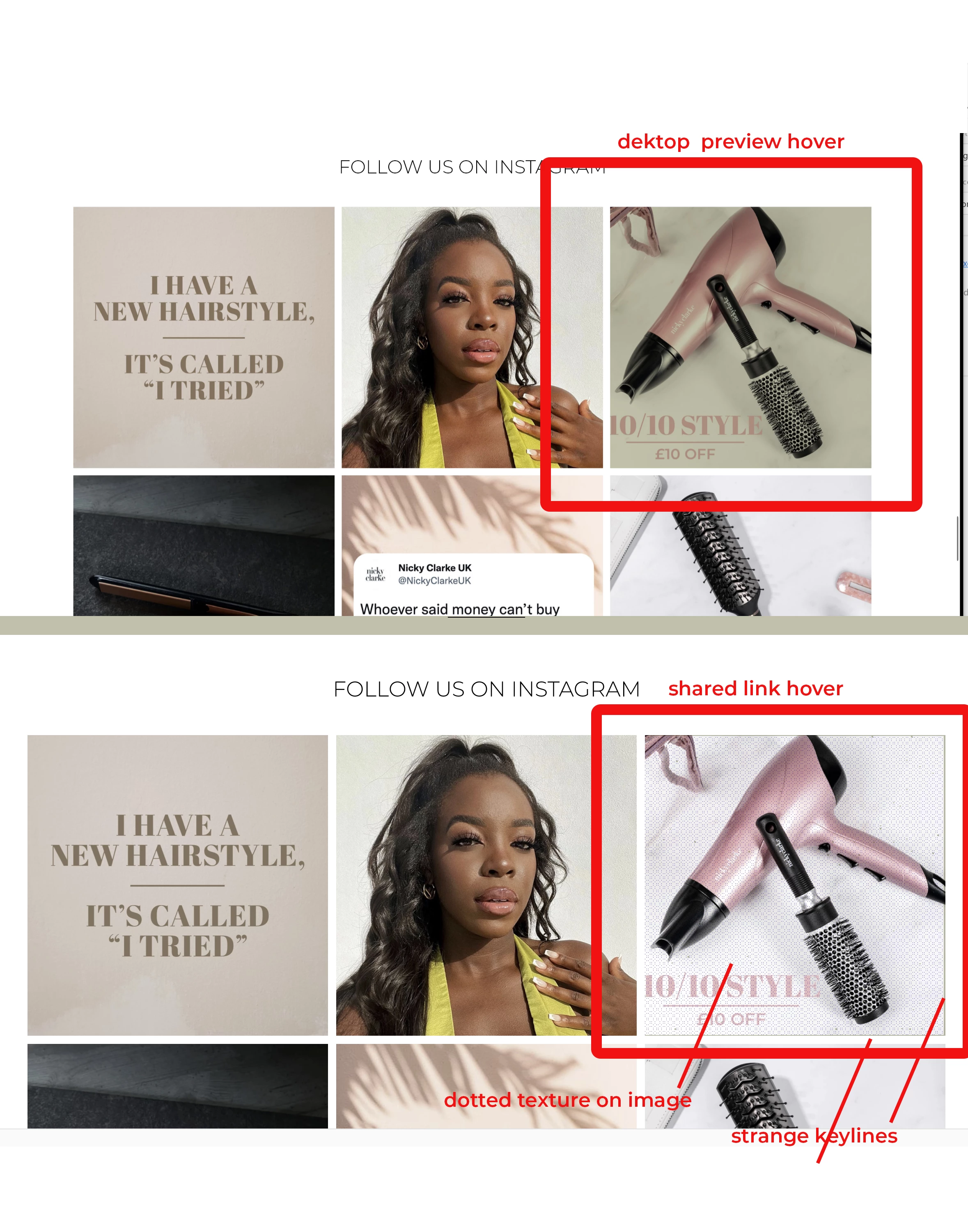
My prototype works as expected in desktop preview but when I view it on a share link, there's very erratic behaviours.

As an example, I have some images with a coloured overlay set to multiply that appears on hover. All good in desktop preview but once I share and go to the link, the overlay is not there. A strange keyline is appearing around the images instead together with a dotted texture. See attached images.

    This topic is closed to new replies. Start a new post to keep the conversation going.
    Dan Rodney
    Dan RodneyCorrect answer
    Community Expert
    Sep 12, 2022 9:05 PM UTC

    yes I did and there's nothing of the sort.


    Which browser are you previewing in? And have you tried restarting your computer? I know that sounds silly, but I've seen many a weird thing fixed by a simple restart.

    Adobe Certified Expert & Instructor at Noble Desktop | Web Developer, Designer, InDesign Scriptor

    10 replies

    Dan Rodney
    Community Expert
    Community Expert
    Sep 12, 2022 9:04 PM UTC

    I think you posted this in the wrong place 🙂 

    Translate
    Adobe Certified Expert & Instructor at Noble Desktop | Web Developer, Designer, InDesign Scriptor
    Dan Rodney
    Community Expert
    Community Expert
    Sep 12, 2022 8:27 PM UTC

    Does it affect multiple files or just this one?

    Look around in the layers panel to see if there's something else hidden somewhere that could be interfering, this is strange behavior.

    Translate
    Adobe Certified Expert & Instructor at Noble Desktop | Web Developer, Designer, InDesign Scriptor
    mowglivjAuthor
    Inspiring
    Sep 12, 2022 8:44 PM UTC

    so far just this one, there's nothing else interfering. As you can see it works as expected on the desktop preview, the fault is in the shared link. I find that everything in XD is strange behaviour...

    Translate
    Dan Rodney
    Community Expert
    Community Expert
    Sep 12, 2022 8:53 PM UTC

    Did you look in the layers panel to see if maybe there are any hidden or leftover elements that might be creating that?

    Translate
    Adobe Certified Expert & Instructor at Noble Desktop | Web Developer, Designer, InDesign Scriptor
    Ares Hovhannesyan
    Community Expert
    Community Expert
    Sep 12, 2022 4:44 PM UTC

    Can you share prototype link to test it? Thanks

    Translate
    mowglivjAuthor
    Inspiring
    Sep 12, 2022 5:23 PM UTC

    not publicly


    Translate