
Varachaud
Inspiring
November 3, 2020
Answered

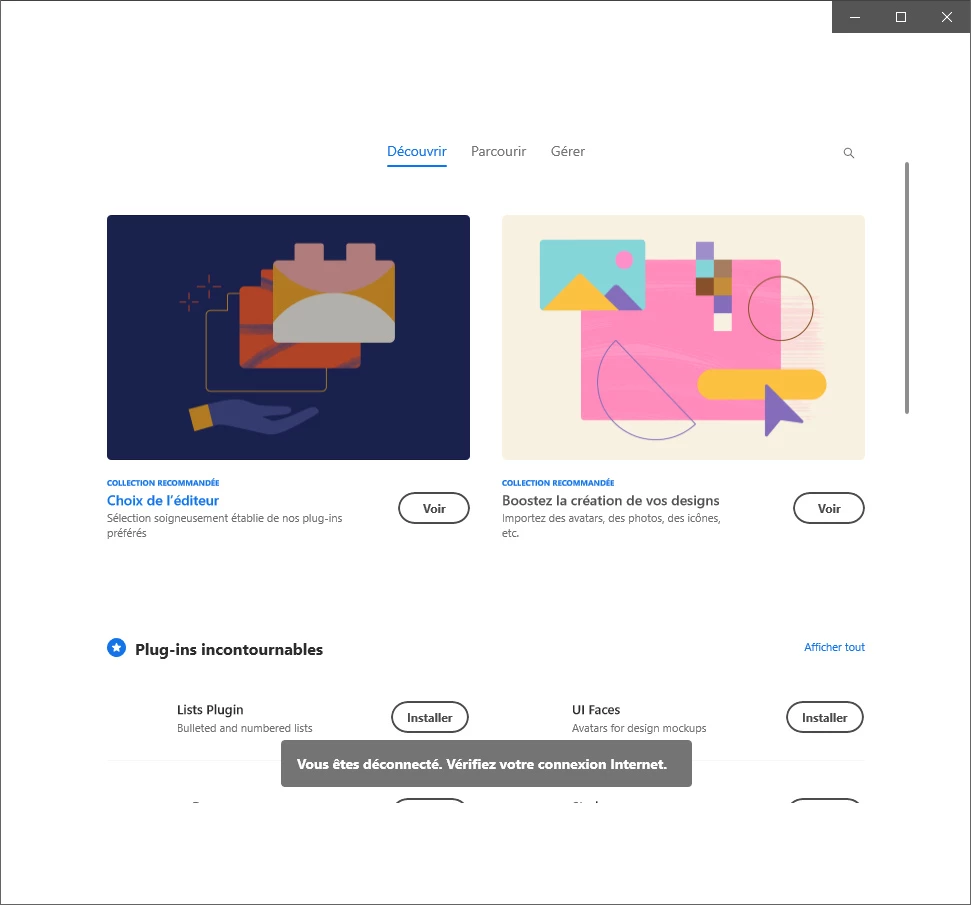
Disconnected - Check your internet connection (XD)

  • November 3, 2020
  • 1 reply
  • 1450 views

Impossible to install plugins in XD. (PC Windows 10)
i spent more than 2hours with support, trying to fix that point.
install, uninstall, re-install XD. clean Adobe applications with the patch. restart my computer. using another networks ... it s always the same issue ... im not connected, so impossible for me to download an install plugins.


try to create manually the plugins folder ... so, completely desesperate 😞


By the way all the others CC 2020 applications are fully connected and works fine
 

    This topic has been closed for replies.
    Correct answer Varachaud

    Well, like i said before, i spent more than 2 hours tryng to fix this probleme with your services.... doesnt work.


    i try one more time and follow the suggestions you gave me ... same issue 😞


    But, i found something interesting. i hope it could help.

    when i click to install plugins its said "Disconnected - Check your internet connection"; becaus i m curious, i try to find manually *.xdx files on my computer.

    I found files, sort by date in a folder name "Adobe.CC.XD_adky2gkssdxte/TempState/UXP/PluginsTemp/Internal/com.adobe.ccext.pluginmarketplace" and began to double click on each files i found. guess what ... it install the plugins in XD.. the pluign i click on it before and wont work.

    When i m back on XD i have the green check on the plugins i download, and fully installed.

    so i can used them, and its a good point.

    Unfortunatly, the update of the plugins doestn work. i must uninstal, download again, go to my folder and double click on it, then its installed.

    i hope i was clear enough to help devellopers or people in the same case as me.


    Regards


    1 reply

    Rishabh_Tiwari
    Legend
    November 3, 2020

    Hi there,


    Sorry to hear about the trouble. Could you please try the suggestions shared in this similar discussion: https://community.adobe.com/t5/adobe-xd/extensibility-while-installing-plugin-in-xd-it-gives-error-quot-you-re-disconnected-quot/m-p/10890547?page=1#M22658


    Let us know if this helps or if you need any further assistance.


    Regards

    Rishabh

    Varachaud
    VarachaudAuthorCorrect answer
    Inspiring
    November 4, 2020

    Well, like i said before, i spent more than 2 hours tryng to fix this probleme with your services.... doesnt work.


    i try one more time and follow the suggestions you gave me ... same issue 😞


    But, i found something interesting. i hope it could help.

    when i click to install plugins its said "Disconnected - Check your internet connection"; becaus i m curious, i try to find manually *.xdx files on my computer.

    I found files, sort by date in a folder name "Adobe.CC.XD_adky2gkssdxte/TempState/UXP/PluginsTemp/Internal/com.adobe.ccext.pluginmarketplace" and began to double click on each files i found. guess what ... it install the plugins in XD.. the pluign i click on it before and wont work.

    When i m back on XD i have the green check on the plugins i download, and fully installed.

    so i can used them, and its a good point.

    Unfortunatly, the update of the plugins doestn work. i must uninstal, download again, go to my folder and double click on it, then its installed.

    i hope i was clear enough to help devellopers or people in the same case as me.


    Regards