
Participant
February 15, 2023
Question

Does anybody have any luck with making Google Workspace work with Adobe XD?

  • February 15, 2023
  • 1 reply
  • 565 views

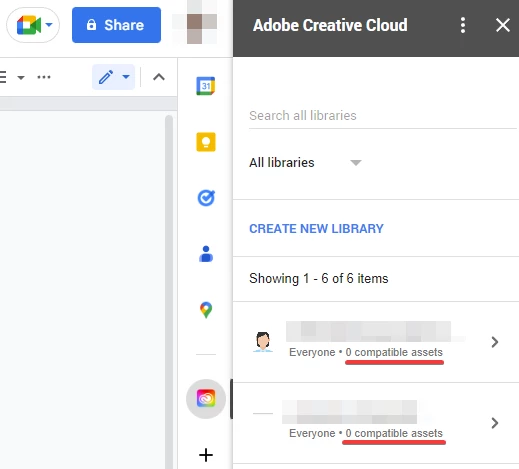
I do get the Adobe Creative Cloud sidebar showing with the libraries shown inside but the only compatible asssets seem to be colors.  No trace whatsover of components such as UI elements, icons, etc. 

Is there something I'm missing somewhere?

What I'm trying to do is to make libraries components insertable within Google sheets/docs.

Thanks!


This topic has been closed for replies.

1 reply

HARSHIKA_VERMA
Community Manager
Community Manager
February 17, 2023

Hi @FranckSC,


Thanks for reaching out, and sorry for the delay in response. 


If you're only seeing colors in your Creative Cloud library and not the components you've saved, it's possible that the components were not saved properly, or there may be an issue with the sync between XD and Creative Cloud.

Here are a few things you can try to troubleshoot the issue:

  • Check that the components are saved in your Creative Cloud library: Open XD and check that the components are saved in your library. You can do this by opening the "Libraries" panel (Window > Libraries), selecting your library, and checking that the components are listed.
  • Check that your Creative Cloud library is synced: Make sure that your Creative Cloud library is synced and up-to-date. You can check this by opening the Creative Cloud desktop app, clicking on the gear icon in the upper right corner, and selecting "Preferences." From there, select "Creative Cloud" and make sure that the "Files" and "Libraries" options are checked.


Please also check this page: Integrations between Adobe Creative Cloud and Google Workspace | Google Workspace Blog, and see if that helps.


Let us know if the above steps helped. We would be happy to help.


Thanks,

Harshika

FranckSCAuthor
Participant
February 20, 2023

Hi @HARSHIKA_VERMA


Thanks for your reply.

All components are visible on Creative Cloud as you can see in the screen captures below.

Plus they are all synced since I'm using them in various flows/prototypes as external components libraries.

Also the UI you are describing doesn't match what I'm seeing (no cog icon on the right corner of the desktop app).

Anyway, there is one thing I would like you to confirm : 

What does "compatible assets" mean actually?

For instance, all my components are only vectors (SVGs) and I don't think that Google Sheets or Google Docs can open SVG file. So maybe it is the reason why they are noot listed as "compatible assets"? But then I don't see any other Google app able of opening SVGs so it's even more confusing.

Thanks in advance for the clarification as there is no documentation on how this feature is supposed to work (big thumb down here to both Adobe and Google).