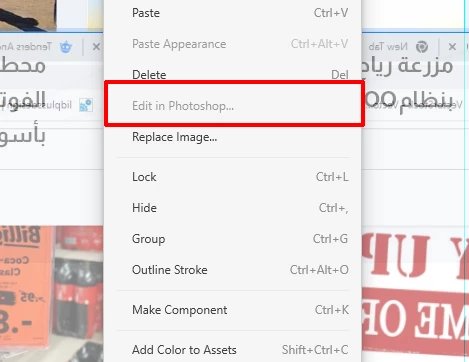
I know this may sound obvious, but you have Photoshop installed right? If you do, then this is odd behavior. Have you tried restarting both XD and Photoshop? Then restart your computer and see if you're still having the same issue.
Adobe Certified Expert & Instructor at Noble Desktop | Web Developer, Designer, InDesign Scriptor
Hi @Mohamed Amr0101, I tried to recreate the issue but failed so I suggest you to if you're not selecting the image from the layers panel try doing so, or just select the image (I'm assuming it's a masked image) by double clicking the group until the image is selected (if it's not selected properly, that might be the issue) or lastly I'd try copying and pasting the image out of the mask, editing and replacing it with the replace image option. I'd also make sure XD and PS apps are up to date. These are the fixes that I can think of, I'd like to be updated about this since as I said I can't recreate the issue, hope this helps!
Hmm, the option "outline stroke" looks interesting also, I'd try to copy the whole object and outline stroke in the copy and try editing it, can be something with the stroke you applied. I think I'd also copy the mask group to another empty document to see, if you can share the file (by replacing image if it contains confidential information) I'd be happy to take a look, you can also message me if you don't want to share publicly. Happy designing!



 AdChoices