



danielvaszka
Participant
June 24, 2020
Answered

Element not displaying correctly

  • June 24, 2020
  • 1 reply
  • 1126 views

Hi,


I need some help figuring out why my colleagues can't see the white background behind the languages, while it looks just fine in my browser (I'm using Chrome, but it works in Firefox and Microsoft Edge too).


I've attached a screenshot sent form one of my colleagues. There should be a white background behind the text.
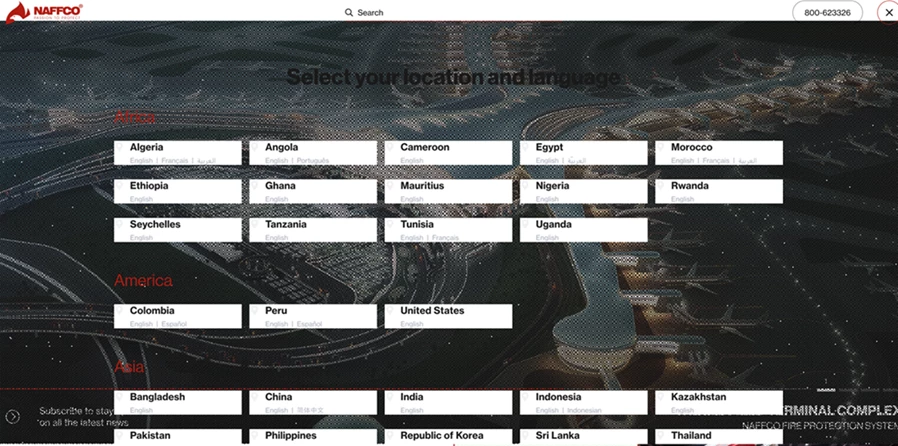


Here is the prototype link https://xd.adobe.com/view/5cc237de-e584-46f9-54f2-e511b135316b-2af3/?fullscreen click on the Lang button top right corner.


I tried updating the link many times, I also generated a new link. Nothing helps...


I would really appreciate if someone can help because the link is now with the client and we need to fix it ASAP.


Many thanks!

This topic has been closed for replies.
Correct answer danielvaszka

Yeah, if it's critical, you can try to investigate further, as you have a "faulty" browser to test things on.

You can make a similar configuration from scratch with appearing white element and a different image under it, and keep making it more and more similar to your design until it breaks, so you can identify the problematic element and find the bug 🙂


If it doesn't break just replace the newly made elements with the ones in the original design and check what happens. Hopefully that makes sense 🙂


Good luck!


Although it's critical, I need to focus on the rest of the pages so I can't spend much time testing. We will see if the client had any issues and if yes, I will have to figure something out. Maybe I will just re-do it as you suggested.


Thanks again for your help! Hopefully somoene from Adobe can help me.

1 reply

Spas K.
Community Expert
Community Expert
June 24, 2020

Seems like a problem on their end. I see it fine, there is a white background when I click on the language dropdown.


Maybe ask them to clear their browser cache or try different browsers so you can pinpoint the issue?

danielvaszka
Participant
June 24, 2020

Thanks for checking it, this is really odd! I asked my wife to check on her laptop and same issue, it shouldn't be cache issue since she never opened this link before. She just tried on Edge and it works, hmm so it's broken on Chrome and works on Edge. This is a first lol

Spas K.
Community Expert
Community Expert
June 24, 2020

I remember I saw a similar issue in another discussion from a few days ago:
https://community.adobe.com/t5/adobe-xd/unexpected-textured-background-in-xd-shared-link/td-p/11069213?page=1


Perhaps it is some sort of bug, maybe try copying everything from that artboard to a fresh new file and link, to test it and see what happens.