

ProfFunami
Participant
April 30, 2020
Question

Error 130 while sharing a file into Adobe XD.

  • April 30, 2020
  • 1 reply
  • 2409 views

Hello.

I'm a Japanese user.


When I share a file I created with Adobe XD with other users, I get a message that says, "Cannot share at this time. Please try again later (error 130)" (Japanese :

現在、共有できません。後でもう一度お試しください (エラー 130)) and I can't share it.

There are reports that the error code 130 is a license error, mainly related to Photoshop, but except for the synchronization error described in the reference below, I'm using AdobeCC, so I think the license has been authenticated correctly.

Also, I've set it to save to the cloud, but it hasn't changed from the "saving" display and I can't save to the cloud.

I looked it up with error code 130, but didn't get any useful information.

Do you know anything about this error?
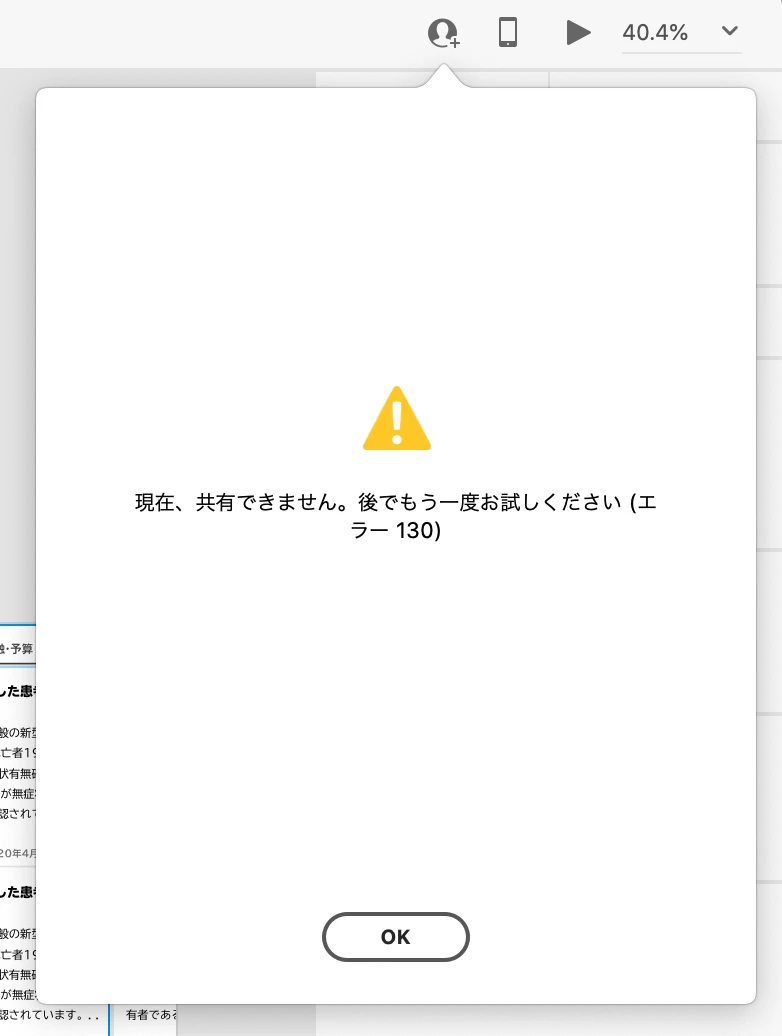
 

(Reference below.)
I don't know if it has anything to do with the cause of this error, but for a few months now I've been seeing "File Sync Error Some files failed to sync" in the Creative Cloud desktop application. The bad thing here is that since we can't see any more information about the error, we don't have the information we need to resolve it, such as which file share failed, what the error code is, etc. We know that the file name is not the culprit because we have implemented a program to check if there are any files that contain inappropriate characters as file names, referring to https://helpx.adobe.com/jp/creative-cloud/kb/arent-my-files-syncing.html.


<The Title was renamed by moderator>

This topic has been closed for replies.

1 reply

HARSHIKA_VERMA
Community Manager
Community Manager
April 30, 2020

Hi there,


We are sorry to hear you are having trouble sharing the file with XD and getting error. We would like to know a few more details like-


  • Is it happening with this specific file or all the files?
  • What is the OS and XD version of your machine?
  • Have you tried switching to a different network and see if that helps?


We will try our best to help.


Thanks,

Harshika

ProfFunami
Participant
May 3, 2020

Thank you for your reply. Again, sorry for the delay in my response.


  • Is it happening with this specific file or all the files?
    Surprisingly, a previously created XD file will say, "I'm sorry, this document cannot be opened." and couldn't open it. On the other hand, all new files created since we became aware of this issue reported this error 130.


  • What is the OS and XD version of your machine?
    The OS is macOS Catalina 10.15.4, the XD version is 28.7.12.4 and CreativeCloudSync is 4.3.36.1.


  • Have you tried switching to a different network and see if that helps?
    Yes, I tried it. However, there was no improvement.


Thank you very much.

HARSHIKA_VERMA
Community Manager
Community Manager
May 5, 2020

Thanks for sharing the details. Is it possible for you to share an old file and a new file with me having both the errors over a private message?


I will try my best to help.


Note: Please share the link of the post over a PM for reference.


Thanks,

Harshika