
Participant
February 3, 2021
Answered

Error importing psd file using XD

  • February 3, 2021
  • 3 replies
  • 2509 views

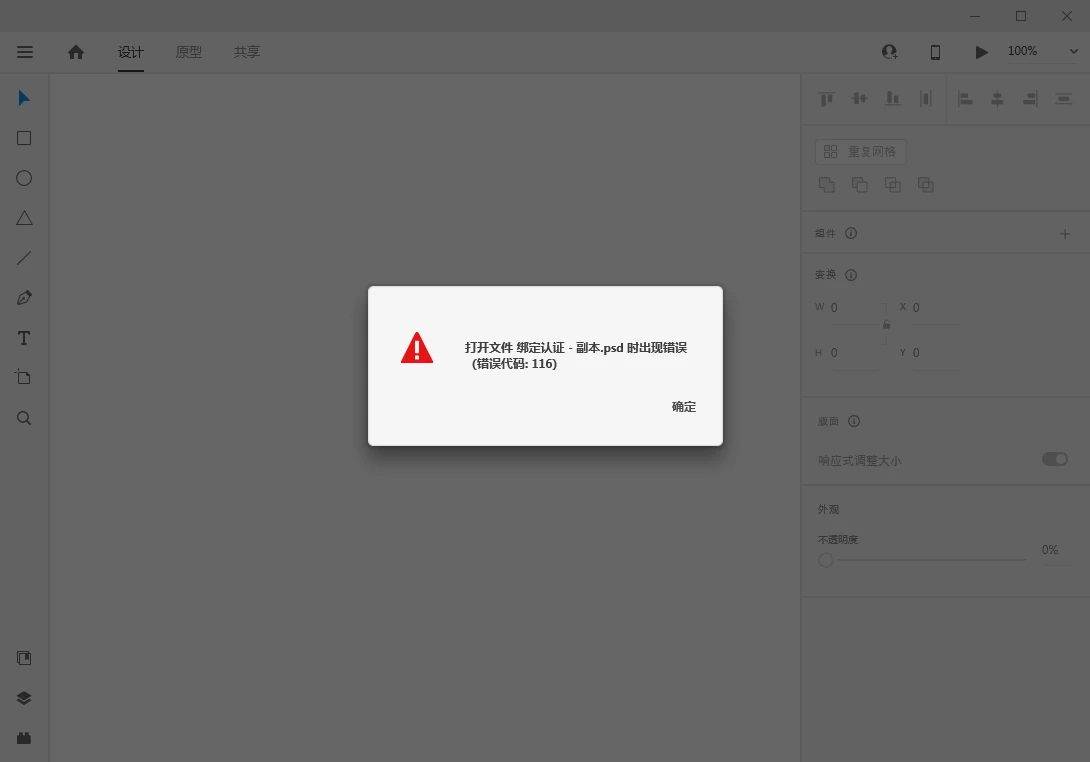
I want to import project files I made in ps when I use XD, but there are always errors when importing. I uninstalled and reinstalled many times, but it still didn't help. Sincerely ask you guys who have encountered this problem. Is there a solution? Thank you in advance (I use the win10 system), the following is a screenshot of the error, the error code is not found on the official website
This topic has been closed for replies.
Correct answer HARSHIKA_VERMA

Hi there,


We are sorry to hear you are having trouble importing Photoshop files into XD. I would request you to please check out this article: https://helpx.adobe.com/xd/kb/open-photoshop-files-in-xd.html for supported and non-supporting features while opening Photoshop file in XD and see if that is what causing the problem.


We will try our best to help.


Thanks,

Harshika

3 replies

Rishabh_Tiwari
Community Manager
Community Manager
February 3, 2021

Hi there,


Sorry to hear about the trouble. We'll need to investigate this so could you please share a few more details like:


  1. The version of XD.
  2. Is this happening with specific PSD or multiple?
  3. Please try creating a sample PSD and check if you are able to import it.


Regards

Rishabh

响5D82Author
Participant
February 4, 2021

I updated to the latest version of XD. Only psd files will have this problem, multiple single files will have the same problem, and other files (such as ai and svg) will have no problem. I recreated a new psd, but the problem still occurs, so I am not sure if this is an XD problem or what is wrong, I hope you find and solve the problem as soon as possible.

italosan
Community Expert
Community Expert
February 3, 2021

Hi, we're sorry you're having trouble with Adobe XD. What software version are you using? Does this problem occur with a specific file or with all files?

响5D82Author
Participant
February 4, 2021

I updated to the latest version of XD. Only psd files will have this problem, but other files such as ai and svg will have no problem. I re-created a new psd, but there will still be problems, so I am not sure if this is an XD problem or what went wrong, I hope you find and solve the problem as soon as possible.

响5D82Author
Participant
February 3, 2021

我在使用XD想导入我在ps做的项目文件时,但是导入的时候总是出现错误,我卸载了多次重新安装,也还是无济于事,诚心请教下各位大佬有遇到过这个问题嘛,有办法能解决嘛?在此先谢过了(我用的是win10系统),下面是出现错误的截图,在官网找不到这个错误代码

HARSHIKA_VERMA
Community Manager
HARSHIKA_VERMACommunity ManagerCorrect answer
Community Manager
February 9, 2021

Hi there,


We are sorry to hear you are having trouble importing Photoshop files into XD. I would request you to please check out this article: https://helpx.adobe.com/xd/kb/open-photoshop-files-in-xd.html for supported and non-supporting features while opening Photoshop file in XD and see if that is what causing the problem.


We will try our best to help.


Thanks,

Harshika

响5D82Author
Participant
February 18, 2021

I have checked the problems listed in the documents on the official website. I created a new PSD file without anything, and then import XD, which will still cause the same problem and open the error. So I hope you pay enough attention to it and can solve the problem. Please contact me in time, thank you