
Participant
March 26, 2022
Answered

Error: Text Library won't load or show any font

  • March 26, 2022
  • 2 replies
  • 1219 views

Hi there,

I am currently working on a project, but when I want to add a text anywhere I can not choose which font I want to pick. In fact it doesn't even show the default font (it shows a blank field). When I click on the dropdown, it opens an empty dropdown.

Something to note would be that there is in fact an orange round exclemation point (as if there would be an error) on the top right next to the text "TEXT" in the settingspanel (-> Image). But hovering or clicking on it won't do anything.
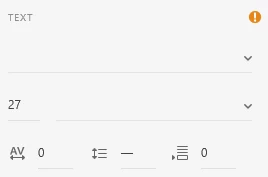
(This is with a text selected)

There is probably just something I missed, but at this point every help would be very much apreciated. Thank you in advance.

    This topic has been closed for replies.
    Correct answer Rosaly Adams

    Here is my update: The error didn't seem to resolve it self, which is why I ended up making a new file. This seemed to have worked. But I had to restart my project anew, which wasn't really fun.

    I don't know what the problem was, especially because other programms like Photoshop, InDesign or Illustrator didn't seem to have any problems with my font library and showed them just as normal but I am happy this wasnt a lasting error.

    2 replies

    Rosaly AdamsAuthorCorrect answer
    Participant
    April 23, 2022

    Here is my update: The error didn't seem to resolve it self, which is why I ended up making a new file. This seemed to have worked. But I had to restart my project anew, which wasn't really fun.

    I don't know what the problem was, especially because other programms like Photoshop, InDesign or Illustrator didn't seem to have any problems with my font library and showed them just as normal but I am happy this wasnt a lasting error.

    AkinGn
    Community Expert
    Community Expert
    April 5, 2022

    Hi @Rosaly Adams, that's probably about a missing font in the file but even if there's a missing font (which is indicated by that orange exclamation mark, I'm not sure it only indicates a missing font though, I think I'd check the assets panel on the left, clicking the "libraries" icon on the bottom left, the one at the top of the other 2 icons there, and see if there's a missing font warning) as I said even if there's a missing font XD shows the text with a default/existing font, seems like you're not able to use any of your system fonts, so that might be a system related issue, I'd try restarting all the apps including creative cloud and open Photoshop etc to see if there's an issue about fonts in the system. Oh I'd also try to find that missing font, install it and see if that resolves the issue. Hope this helps!