


Participant
August 25, 2021
Answered

Error-The tag present in the reparse point buffer is invalid when try to overwrite the file in XD 43

  • August 25, 2021
  • 2 replies
  • 7392 views

I'm working on a local file, and at some point, when I try to save, I get a message along the lines of "the file is not there anymore" or... I don't know, I didn't screencap it.


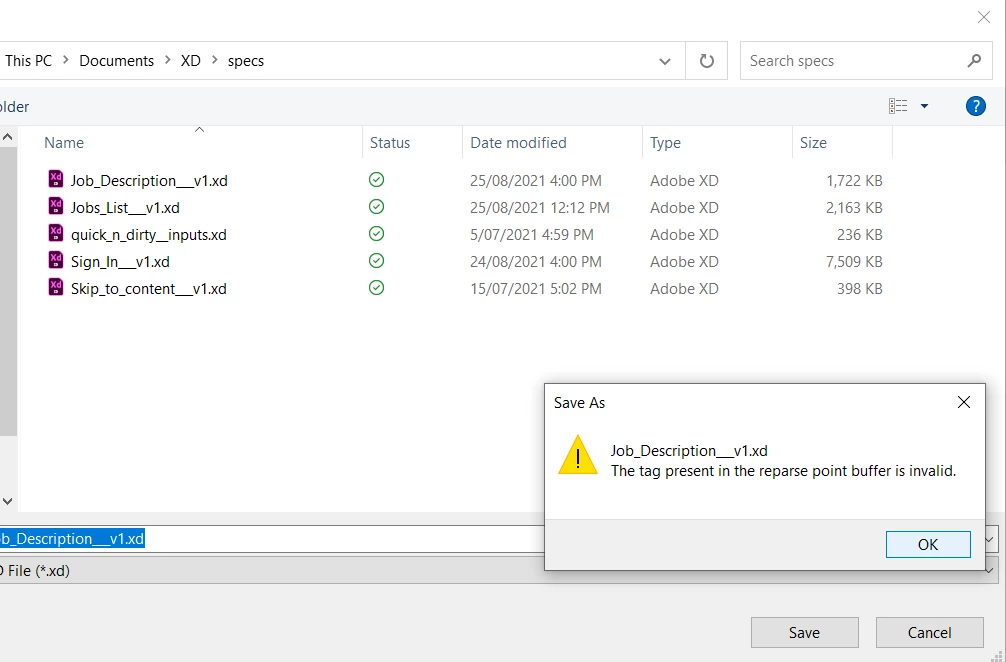
  1. I proceed to verify that my file (Job_Description_v1.xd) is in fact still where I put it in my local machine. (It is, the screenshot shows it.)
  2. I try to overwrite the local file with "Save as" using the same name  (Job_Description_v1.xd), and a dialogue pops up with "The tag present in the reparse point buffer is invalid." and XD won't allow me to overwrite my file that way.
  3. I save as a different name (Job_Description_v1.1.xd) and this now works. The thing about this "workaround" is, I now I have to create and update all the links to the prototypes/specs again!
If you prefer to work with local files DO NOT UPDATE TO 43.0.12, avoid it like the plague.


<Title renamed by moderator>

This topic has been closed for replies.
Correct answer HARSHIKA_VERMA

Hi Jasminn5E99,


Thank you for reaching out and sorry for the trouble. We would like to know if this is occuring inside OneDrive? If yes, then we would request you to please try the steps suggested in this article: https://www.itexperience.net/fix-onedrive-the-tag-present-in-the-reparse-point-buffer-is-invalid/


Let us know if that helps.


Thanks,

Harshika

2 replies

Participant
May 22, 2023

I had an issue like this today with one of my users - they downloaded a PDF and then were unable to delete or rename the file due to the listed error. I did some testing and was able to fix it by performing the below steps:


  1. Right click on the file
  2. Select Properties
  3. Select Details tab
  4. Click the link for “Remove properties and personal information” at the bottom
  5. Select “Remove the following properties from this file:”
  6. Click Select All
  7. Press OK
  8. Attempt to delete or rename the file
HARSHIKA_VERMA
Community Manager
HARSHIKA_VERMACommunity ManagerCorrect answer
Community Manager
August 25, 2021

Hi Jasminn5E99,


Thank you for reaching out and sorry for the trouble. We would like to know if this is occuring inside OneDrive? If yes, then we would request you to please try the steps suggested in this article: https://www.itexperience.net/fix-onedrive-the-tag-present-in-the-reparse-point-buffer-is-invalid/


Let us know if that helps.


Thanks,

Harshika

Participant
August 25, 2021

Thanks Harshika, this method seems to have worked. I am now able to open and save the original file.


Sadly, I've already re-created a workaround file this time. I have bookmarked this fix for the next time.

HARSHIKA_VERMA
Community Manager
Community Manager
August 27, 2021

Glad to hear you're able to resolve. Please feel free to reach out to us in the future for any query related to XD.


We would be happy to help.


Thanks,

Harshika