
Error updating components and unable to remove from assets list
My linked components are not updating, despite trying what feels like everything to fix it, and that is an issue and and of itself.
Furthermore, despite removing all instances of these components from the document, many of them still appear in my document assets list and the option to delete them or make local is not there. Only 'update'. These same assets continue to bring me error messages and prevent me from updating my assets, despite it not even existing in the document anymore.
To elaborate:
I have an XD library which contains all the assets for our product mock-ups. While creating mock-ups I have run into the issue of several components not updating to the most recent version from my linked asset library.
I continuously recieve error messages that reads: 'Component 'X' has required components that conflict with components in your document. Please update the libraries with these components to the same version: 'X', 'Y', 'Z' and so-on.'
After spending a long time trying to fix the issue, I decided to just delete/make local all instance of component 'X' (and related components) in my document, and attempt to update the asset library once again. A new error message appeared: 'Component 'A' was not imported. Republish the library from the source document.'
I investigated why component 'A' specifically is causing issues, and can't see anything wrong with it. It is a parent component, so I went through each nested component, and ensured they were up to date and reflective of the main state. Still can't be imported.
So, to move past this issue, I go through and delete all instances of component 'A' from my document, and try to update again. Same error. I cannot find component 'A' in my asset list, but I can see a component that was nested inside component 'A'. When I click 'highlight on canvas', there are 0 instances of this component found.
So, I right click the asset, and see that I can neither delete it, or make it local.
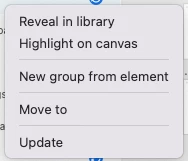
At this point, I just want it gone so I can update the rest of my assets.
When I view my document assets list I see several components that are not actually in my document (including that one) that require updates, but when I click 'update' I continue to get that same error: 'Component 'A' was not imported. Republish the library from the source document.' There is no component 'A' that even needs to be imported anymore!? it's not even in the document. Neither is the element that was nested within it.
I have spent all day trouble-shooting this issue, looking through forums etc., and have yet to find a solution that isn't just starting fresh from a new document and copying everything over exclusive of the problem components.
Why aren't my assets updating?
How can I get rid of the assets that are bringing me errors from my asset list after removing them from the document?
Before you suggest a fix, please note I have already done the following:
- I have ensured that all nested components and the elements within nested components are up to date.
- I have tried individually updating each element, and clicking 'update all'. Same error regardless.
- I have gone through the list of components in the error message and ensured they were up to date and still existed within the library - and manually 'resetted to main state' all component elements. (NOTE: some components listed in the error message weren't even used in the document)
- Ensured all components that had a broken link were either re-linked or made local.
- Ensured that all components that couldn't update due to the original component not existing anymore / changing names etc. were made local
- I have ensured all my libraries were open and running on the same version of XD.
- Fully updated Adobe XD. Running macOS Monterey Version 12.1
I am not an admin, so I cannot reach out via the contact page.


 AdChoices