Participating Frequently
July 13, 2017
Answered

Experience design not in my CC app, I have win 10 with all latest updates

  • July 13, 2017
  • 1 reply
  • 447 views

Hi,

I have tried and tried to find a solution to this, Adobe XD is not in my apps list on CC desktop, I have a group membership but have checked with my administrator and they report it should be there.....

This is the windows 10 version on my system, new updates were installed today.
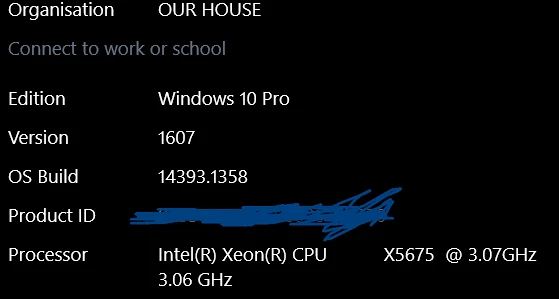
                                                                                                                   I've tried using the download link, it opens the CC desktop app but XD still isn't there.

I've tried uninstalling and reinstalling Creative Cloud, no joy.

Any help on this?

Thanks, Sally.

This topic has been closed for replies.
Correct answer Preran

The team also suggested the following solution. Can you try and let us know?

  1. Disable Windows Compatibility mode for the Creative Cloud desktop app:
  2. Navigate to C:\Program Files (x86)\Adobe\Adobe Creative Cloud\ACC\
  3. Right-click Creative Cloud.exe and choose Properties.
  4. On the Compatibility tab, deselect the Run this program in compatibility mode for option.
  5. Restart your computer.
  6. Launch the Creative Cloud desktop app.

Thanks,

Preran

1 reply

Preran
Legend
July 17, 2017

I am checking with the team. Meanwhile, can you confirm that you are using the link in this post?

Adobe XD is not showing up in creative cloud.

Thanks,

Preran

OhMalleyAuthor
Participating Frequently
July 17, 2017

Hi Preran,

Thanks for your reply.

Yes that is the link I am using.

Since my initial post I have updated Windows 10 to the Creators update,

.... XD still isn't showing in Creative Cloud under all apps, and the download page (the link you pointed me to) tells me I need the Anniversary Update.

I previously had XD on my windows 7 laptop, which was where I initially installed Creative Cloud desktop....the windows 10 computer has the second CC installation on the same account. It's only recently I looked for XD, it was in the start menu on my computer, when I tried to open XD it reported that it needed to update. When I tried to update CC desktop opened without the app showing, the same behaviour as when I try the direct download link.

I'm wondering if some of the program files could have been inadvertently removed or corrupted?

Thanks for your time.

Sally.

Preran
Legend
July 19, 2017

Apologize for the late response. Please send me your Adobe ID, location, and phone number over a private message. Click my picture and use the Message button. We will get in touch with you for investigation.

Thanks,

Preran