


Participant
April 8, 2021
Question

Export from XD to Zeplin is not possible.

  • April 8, 2021
  • 1 reply
  • 540 views

Export from XD to Zeplin is not possible.

As shown on the capture screen, pressing the export button or pressing the Zeplin upload shortcut opens the Zeplin. But I can't upload the art board to Zeppelin because the screen for selecting the project doesn't appear.

I purchased a new i-Mac in April 2021 and installed a new XD. (intel chip)
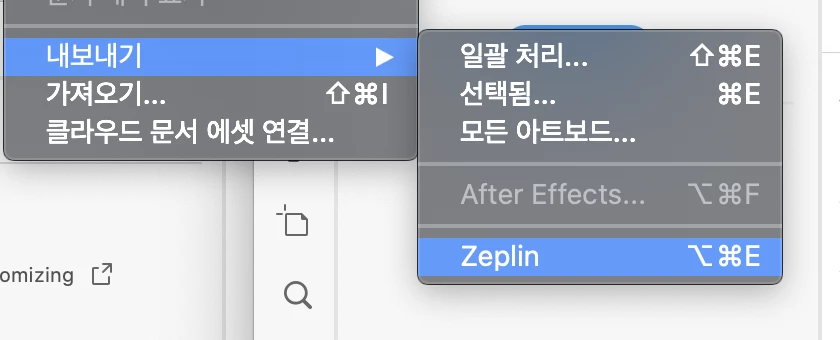


I've already found an example of a similar error.
https://community.adobe.com/t5/adobe-xd/%EC%96%B4%EB%8F%84%EB%B9%84xd-%EC%9E%AC%ED%94%8C%EB%A6%B0-%EB%82%B4%EB%B3%B4%EB%82%B4%EA%B8%B0-%EC%98%A4%EB%A5%98/td-p/11785626


And I've already found a case where I've experienced.
What should I do?


This topic has been closed for replies.

1 reply

Rishabh_Tiwari
Legend
April 8, 2021

Hi there,


Sorry to hear about the trouble. Could you confirm if you have tried the steps shared in the above discussion? If not, please try the steps shared below:


  1. Uninstall Zeplin and remove it from the trash as well.
  2. Restart Machine.
  3. Download Zeplin and re-install.
  4. Open Adobe XD.
  5. Create a new file and export it to Zeplin.
  6. XD will ask for permissions to open Zeplin(Click on Allow/Okay)


Let us know if this helps or if you need any further assistance.


Regards

Rishabh


Participant
April 9, 2021

I've already done it.
I can't solve this problem.

Harshika Verma
Community Manager
Community Manager
April 13, 2021

Thanks for trying the steps suggested by Rishabh. We would request you to please go through this post: https://community.adobe.com/t5/adobe-xd/zeplin-export-won-t-show-in-adobe-xd/m-p/9675628


Let us know if that helps. If it doesn't, please try reinstalling zeplin and share results.


We will try our best to help.


Thanks,

Harshika