
Participant
Dec 24, 2019 9:23 PM UTC
Question

Export Prototype on Adobe XD Enterprise opens blank webpage

After viewing and reading tutorials on how to share a prototype built in XD I have attempted to perform the steps on my own project but just get a blank screen and console errors when I attempt to open the index.html file in my browser.  I am using the latest version of XD Enterprise.

here is what I have done:

  1. Once all of my artboards were wired up, I selected the tap in the upper left of my home artboard, and it turned blue. 
  2. In the Share tab, the home artboard, and all of the wired up artboards are highlighted in Blue.
  3. Set the preset to Design Review
  4. Select 'Export Prototype', the process runs, and a folder is added to the export destination.
  5. Open the exported prototypes folder in Finder and open the index.html file in my browser.
  6. A blank screen loads witht the following console errors:
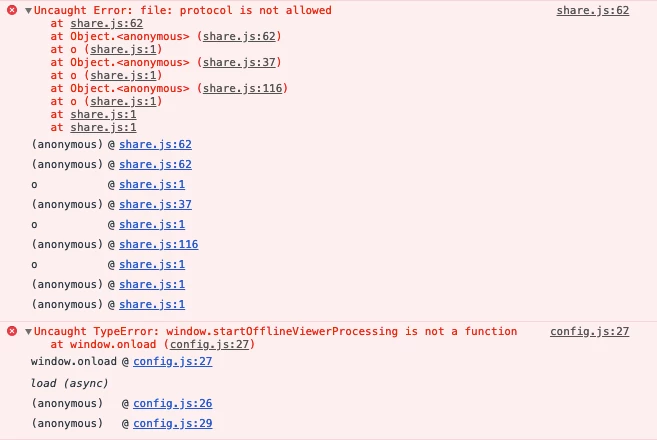


Can anything be done to fix this?

This topic is closed to new replies. Start a new post to keep the conversation going.

4 replies

Participant
Nov 12, 2020 6:48 AM UTC

I face the same issue with Windows 10. Perhaps the Enterprise version causes the problem - here the creation of a share link is not allowed. Using the export option instead does not help either, because the page is blank and the exported code is not very helpful. It is very annoying that there is no way to hand off design specification easily in the company network.

Still I hope for updates solving this issue.

It would be nice to finally receive it.

Thanks.

Translate
Participant
Jul 29, 2022 11:19 PM UTC

Are there any updates on this? I'm on a mac XD version 51.0.12.6x64 and this issue is persisting 


Translate
Harshika Verma
Community Manager
Community Manager
Dec 27, 2019 5:07 PM UTC

Hi there,


We are sorry to hear you are having trouble using XD. Would you mind sharing the OS build of your machine? It would be really helpful if you can share a short video of the workflow for better understanding of the situation. 


We will try our best to help.


Thanks,

Harshika

Translate
Participant
Nov 2, 2020 1:33 PM UTC

I have got the same issue, so let me reply instead of creating a new topic. I followed exactly the same procedure  as above.

I have a Windows 10 (10.0.18363.1082) machine and am running Adobe XD (34.1.12.9).

Thanks,

B.

Translate